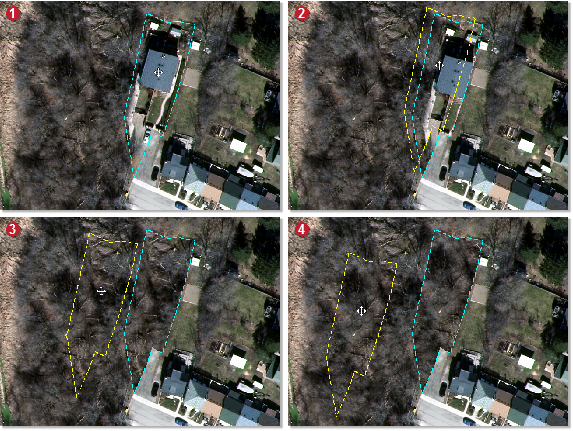
An alternative to using Copy mode is to use Fill mode to paste pixels from a source area. In Fill mode, you draw a polygon around the area of interest, and then drag the polygon to the area you want to copy pixels from. When you drag the polygon, a new polygon—a source polygon—is displayed. The original polygon you drew—the destination polygon—remains at the AOI.
The destination polygon is then filled with the pixels at which the source polygon is located. After you are satisfied with the placement of the pixels, and if necessary, the blend width, the color balancing or exposure correction, you then paste.
Repairing an area of interest in Fill mode
- Zoom, pan, or both, as necessary to the AOI you want to repair, and then open Smart GeoFill.
- On the toolbar of the Smart GeoFill window, click the arrow beside Selection Mode, and make sure Fill is selected.
- In the Source list, make sure Output is selected.
- On the toolbar, click Selection Mode, and then in the viewer, draw a polygon around the area you want.
- Drag the source polygon to the area you want to use to fill the destination polygon.
- After you drag the source polygon to the new location, in the Smart GeoFill window, select the Blend width check box, and then type or select a value in the box to the right.
-
On the toolbar, click Show Selection Edge (to hide the selection edge), and then verify the suitability of the blend between the inside and outside of the polygon.
You can further adjust the blend width to suit. If necessary, you can also adjust the color balancing or exposure correction to match the inside of the polygon to the outside.
-
After you are satisfied with the placement of the source polygon, the blend width, color balancing, and exposure correction, on the toolbar, click Paste.