By using a subset of imagery used in the procedure in Plotting the position of imagery, you can examine the subset to determine the flight direction and data-acquisition scheme.
To determine flight direction and flight lines:
-
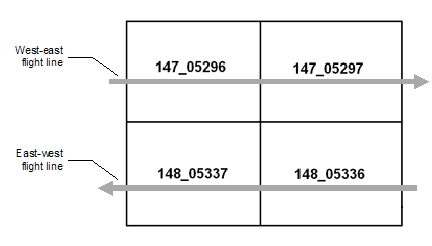
Examine the Image_IDs in the sample block to determine the flight lines.
Typically, the Image_IDs have a specific sequence that indicates the order in which the images are acquired.
-
When you have an idea of the flight lines, load the images individually in CATALYST Professional Focus, and then confirm that the features in the images reflect the flight line and acquisition scheme.
For example, by using the data from the Plotting the position of imagery procedure, you can make the following observations:
-
By examining the Image_IDs for the sample block, you can discern the that the flight lines run west-east and east-west.
-
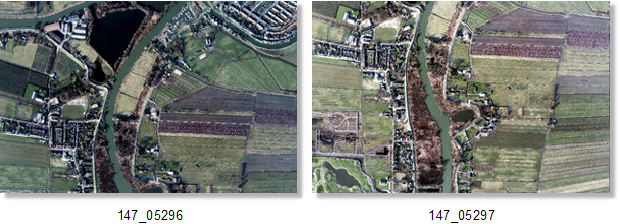
By loading each image of the sample block in Focus, you should be able to see features of interest displaced between two images in a single flight line to reflect the flight direction and acquisition.
-
By examining the two images in Focus, it is evident that features of interest are displaced in the north-south direction, instead of west-east. If the images were rotated by 90 degrees CCW, the images would be oriented properly such that they reflect the west-east flight line. Keep this in mind when performing the check and validation of the kappa value.
-