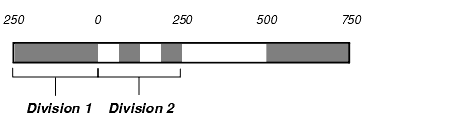
You can selct the number of subdivisions you want in a scale bar and where to show the subdivisions.
For example, one subdivision in the scale bar can be displayed in the second division, as shown in Figure 1.
Figure 1. Scalebar divisions and subdivisions
To select the divisions to subdivide
-
In the Scale bar Properties window, click the Subdivision tab, and then under Subdivisions, click Advanced.
The Scalebar Subdivisions Advanced window appears.
- In the Divisions to subdivide box, type or select the number of by which you want to subdivide the divisions.
- In the Starting at division box, type or select the number of the division where you want the subdivisions to begin.