Parameter descriptions
MFILE
The name of the input CATALYST Professional OrthoEngine project file, a specification of files by using a wildcard (*), or a text file in which each line is the path and file name of an OrthoEngine project. When you specify two or more OrthoEngine projects, they are merged into a single project to perform TP matching.
Images in the input project file or files must have an approximate math model, based on either existing information in the math-model segment or the orbit segment.
When your input is several projects, which are merged subsequently, the images must have a one-to-one mapping with photo ID. That is, a single image file referenced in more than one project must have the same photo ID in all projects, and the photo ID must be unique to that one image file.
OEPROJO
The name of the OrthoEngine project file to which to write the TPs collected automatically by AUTOTIE .
If a file with the same name exists in the folder you specify, an error message is displayed.
If you do not enter a path name, or you enter a relative path, the file is saved relative to the current working folder.
IMGSET
The processing method to use for overlapping images.
- ALL: TPs are measured for each pair of overlapping images.
- [Image ID]: One or more comma-delimited image IDs, such as, 'IMAGES SPOTLEFT,SPOTRIGHT' . TPs are measured for all overlaps involving at least one of the specified images, including overlaps between images specified in the image set. Alternatively, you can specify a single image ID, such as, 'IMAGES SPOTLEFT' .
- PROJOVERLAP: When your input is several projects, which are merged subsequently, AUTOTIE measures only overlaps spanning various projects. This is useful when the same image pair occurs in two or more projects and already has TPs in the original project.
If no value is specified for this parameter, AUTOTIE searches for TPs between any two overlapping images in the project.
LOCLMASK
Specify whether to apply a local mask to prevent points from being collected in those locations. If no value is specified for this parameter (default), or you specify a value, but one or more of the images do not contain a bitmap or vector segment, no local exclusion mask will be applied for those images.
LOCLMASK = (NONE | BIT | VEC | <n>)
- NONE: exclude no pixels from the computation
- BIT: use when there are bitmap segments in at least some of the image files that define exclusion regions. When one of the images contains multiple bitmaps, the last one is used. All image pixels covered by the bitmap are excluded from point collection.
- VEC: use when there are vector segments in at least some of the source image files that define exclusion regions. When one of the source images contains multiple vector segments, the last one is used. This vector segment must be a polygon, and all image pixels enclosed by the polygon are excluded from point collection.
- <n>: specifies a particular segment number that contains the desired mask segment to be used.
This parameter is optional.
EXTPRULE
The rule to apply for processing existing TPs in the input project or projects.
- Replace existing tie points (REPLACE): Remove the existing TPs in the input project and replace them with those newly measured.
- Add existing tie points (ADD): Add new TPs to the input project that contains existing TPs.
DBIC
The channel or channels in the input image file to use for matching TPs in a pair of images. When you specify two or more channels, averaging is used to determine matching.
Ranges of channels or segments can be specified with negative values. For example, {1,-4,10} is internally expanded to {1,2,3,4,10}. When you are not specifying a range in this way, only 48 numbers can be specified explicitly.
FILEDEM
The name of a file, folder, or DEM index file that contains digital elevation model (DEM) tiles.
If FILEDEM is the name of a single raster DEM file, the values of DBEC and BACKELEV are applied, if defined.
If no value is specified for FILEDEM , the offset value specified for ELFACTOR is used for the elevation. If a value is specified neither for FILEDEM nor ELFACTOR , an approximated elevation value is calculated from the system DEM file gmted2010.
If the value of FILEDEM is the name of an existing folder, the specified folder is read for a index.txt file. The index.txt file must be in the DEM index format.
If the value of FILEDEM is the name of a text file ( *.txt ), the file must be in the DEM index format.
For more information about the format of the DEM index file, see DEM index file .
DBEC
The channel that contains the digital elevation model (DEM).
If the value of FILEDEM is an empty string or a DEM index text file, this parameter is ignored.
BACKELEV
The background elevation (NoData) value of the input DEM. Areas that are defined as NoData in the DEM are excluded from consideration while searching for TPs.
If no value is specified for this parameter, AUTOTIE scans for ELEVATION_BACKGROUND or NO_DATA_VALUE metadata tags, first at the channel level, and then at the file level. If this value is neither specified nor found in the metadata, a default value of -32768 is used.
If the value of FILEDEM is an empty string or a DEM index text file, this parameter is ignored.
ELEVREF
The vertical reference for the elevation values in the source DEM, or for the constant Elevation Offset and Elevation Scale ( ELFACTOR ) value or values, if defined.
- MSL: elevations are referenced to mean sea level (MSL). If no value is specified for this parameter, MSL is used by default. The EGM2008 geoid model will be used to convert the elevations to ellipsoidal heights.
- ELLIPS: elevations are referenced to the ellipsoid. The coordinate system of the DEM raster file is read to determine which ellipsoid and datum to use; for example, if the DEM file is referenced to NAD83, the heights are assumed to be NAD83 ellipsoidal heights. If the DEM and math model are based on different coordinate systems, the heights will be converted automatically to the coordinate system of the math model before use.
If the value of FILEDEM is an empty string or a DEM index text file, this parameter is ignored.
ELEVUNIT
The unit of measure for the elevation values of the input DEM file. If necessary, you can specify the second value as the vertical accuracy of the DEM to use for TP collection. This DEM will also be used during TP collection by changing the TPs to elevation TPs.
- METER
- FEET
- US_FEET
- METER, 15
If elevation values are specified by using FEET , the conversion factor to meters is 0.3048 (corresponding to International Feet). With US_FEET , the conversion factor to meters is 1200/3937 (corresponding to U.S. Survey Feet).
If no value is specified for this parameter, AUTOTIE scans for an ELEVATION_UNITS metadata tag at the file level, and then again at the channel level. If this value is neither specified for the parameter nor found in the metadata, METER is applied.
If FILEDEM is an empty string or a DEM index text file, this parameter is ignored.
ELFACTOR
When you specify an input DEM, the scale and offset values you specify for ELFACTOR are used to shift and scale the DEM pixel values to those of ELEVUNIT .
With this parameter, you specify two values: the first number defines the offset while the second, optionally, specifies the scale.
The conversion formula is as follows:
scale × (DEM_pixel_value + offset) = elevation_value
If no value is specified for FILEDEM , only the offset value of ELFACTOR is significant. The value is interpreted as a uniform elevation value in the units of ELEVUNIT and using the vertical reference specified for ELEVREF . If a value is specified neither for ELFACTOR nor FILEDEM , an approximate DEM based on the global DEM file (located in the etc folder of your CATALYST Professional installation) will be used.
If FILEDEM is an empty string or a DEM index text file, this parameter is ignored.
If a value is specified neither for ELFACTOR nor FILEDEM , default values of 0.0 and 1.0 are used for offset and scale, respectively.
SMPLSRC
The source of sample points for matching TPs, and the number of points to use. Sample points may be generated automatically by using the SUSAN or GRID option.
-
SUSAN:[samples=<s>],[trials=<t>]
Sample points are generated automatically by using the Susan algorithm, which finds the candidates by running a corner-detection algorithm on the image, looking for corner-like features to use as candidates.
- samples=<s> where s is the number of samples to use. A default value of 64 is used for DISTRIB="ENTIRE" and 25 for DISTRIB="OVERLAP".
-
trials=<t>
where
t
is the number of trials for each point before giving up on the match. The algorithm will try to match the primary sample point and, if that fails to match, a secondary point will be chosen within the same grid cell as an additional sample. The value can be any integer value ranging from
1
through
5
. The default number of trials is
1
.
Note: The value you specify may slow the matching process. That is, a greater value will slow the process more than a lesser value, because the higher number means the system will try that many more times to match in each cell.
-
GRID:[samples=<s>],[margin=<m>],[trials=<t>]
Sample points are generated automatically by using sample points distributed evenly across the overlap region.
- samples=<s> where s defines the number of samples to use. The size of the grid cells is selected automatically based on the number of samples requested. A default value of 64 is used when ENTIRE is specified for DISTRIB and a value of 25 is used when OVERLAP is specified.
- margin=<m> where m controls the minimum distance, in pixel units, between the edge of the image and the placement of the candidates. The edges of the candidate grid will be m pixels from the image edge. If no margin is specified, it will be calculated automatically to be five percent of the overlap dimension or 256 pixels, whichever is less.
-
trials=<t>
where
t
specifies the number of trials for each point before giving up on the match. The algorithm will try to match the primary sample point and, if that fails to match, a secondary point will be chosen within the same grid cell as an additional sample. The value can be any integer value ranging from
1
through
5
. The default number of trials used is
1
.
Note: The value you specify may slow the matching process. That is, a greater value will slow the process more than a lesser value, because the higher number means the system will try that many more times to match in each cell.
If no value is specified for this parameter, a default value of SUSAN:64 is used.
The SUSAN and GRID options determine how to find the initial candidate positions in one image—the source image—for collecting sample points. AUTOTIE builds a patch around each candidate position for which it searches in overlapping images.
- The SUSAN option finds the candidates by running a corner-detection algorithm on the image, which looks for corner-like features to use as candidates.
- The GRID option creates candidates in a grid-like pattern. Because this option does not preprocess the image, it tends to be faster, but it may find fewer matches because the grid point might fall on a featureless flat patch somewhere in the image that cannot be matched to anything in the overlapping images.
When collecting TPs, the SUSAN option is often preferred, because it facilitates performing quality assurance on the collected TPs; that is, you can visualize a recognizable feature (a building corner or specific tree, for example) and look at another image to see if it matches correctly.
- SUSAN:64
- GRID:64
DISTRIB
The area of each image in which to distribute the number of TPs per SMPLSRC:[num_samples] .
-
ENTIRE: evenly distributes TPs in the entire image being matched. The number of samples is multiplied by the overlap percentage and the density of candidate distribution is relatively constant. ENTIRE is used typically with aerial imagery.
Figure 1. Distribution with ENTIRE using a value of 9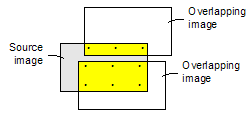
-
OVERLAP: evenly distributes TPs only in the area that overlaps the adjacent image. OVERLAP: is used typically with satellite imagery in which the overlapping areas may be less regular than in aerial imagery. Smaller overlaps provide a distribution of candidates that is more dense.
Figure 2. Distribution with OVERLAP using a value of 10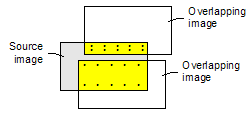
ALGO
The algorithm used for automated matching of TPs.
- FFTP: Fast Fourier Transform Phase Matching: When two images have a relative shift between them, the result is a phase difference in the Fourier domain. FFTP determines the shift between images using this phase difference.
- NCC: Normalized Cross-Correlation: This method finds the relative shift between two images by finding the shift that produces the maximum cross-correlation coefficient of the gray values in the images.
If no value is specified for this parameter, FFTP: Fast Fourier Transform Phase Matching is used by default.
When the two images being matched have similar gray values and appearances, NCC generally produces acceptable results. When there is a rotation or image-size error in the initial math models, NCC may produce better matching results than FFTP. Because the template size that NCC uses is smaller than that of FFTP, NCC also typically generates faster results.
For more consistently accurate results, one of the FFTP-based methods is recommended. An FFTP-based method uses a larger template size than NCC and, because it works in the frequency domain, it looks at the patterns of details in the image rather than the gray values in a small neighborhood, which NCC uses. This makes it more robust than NCC when there is a large difference in brightness between images or when a major land-use change has occurred. FFTP-based methods also better match images of the same area from different sensors or spectral bands.
SEARCHR
The size of the area to search in a target image. The unit of measure for this value is determined by the value of Search radius units ( SEARCHUN ).
Matching candidate points in the source image are projected to the ground, and then reprojected to the target image. You must have a good initial position for the two correlation windows. With an aerial project, a good initial position can be determined when the exterior orientation (EO) parameters of the images are accurate.
- If the contrast of the images is very low or very high, AUTOTIE may not be able to determine the correlation. Make sure the images have an appropriate level of contrast.
-
If the search radius is too small, too few TPs may be collected, and if the initial position information is inaccurate, or there is a large amount of terrain relief, the TPs may be distributed unevenly. Be sure to use a search radius of an appropriate size. A larger search radius will increase processing time, however.
Tip: To quickly determine an appropriate search radius, generate two coarse orthorectified images by using an average constant-elevation value, and then determine the greatest offset for the same feature point in the overlapping images. You can use the offset, plus a certain amount of buffer, as a reference for the search radius to use in collecting TPs.
The search radius specifies the distance from a starting location on the target image over which to conduct the search for the best match with a fixed point on the source image.
The search radius is also an estimation of error with the positional information of the raw image and the accuracy of the DEM. If you know that your images are accurate to 80 meters, and your DEM is accurate to 200 meters, set the search radius to 280 meters. A larger search radius—for example, 300 or greater is recommended for hilly or mountainous terrain—will require more processing time, because more locations are evaluated to determine the best match for a TP.
If no value is specified for this parameter, AUTOTIE uses a default search radius of 100 pixels.
SEARCHUN
The unit of measure of the value of Search radius ( SEARCHR ).
- PIXEL: search radius in pixels
- METER: search radius in meters
- FEET: search radius in feet
- US_FEET: search radius in U.S. Survey feet
With PIXEL , the value is interpreted as the number of pixels in the reference image. With METER , FEET , or US_FEET , the search radius represents meters or feet in the reference image.
MINSCORE
The threshold value to use to control acceptance or rejection of a candidate TP as valid. The value is the minimum match quality to consider as an acceptable match, with 1.0 indicating a perfect match.
When using the FFTP matching method, the value is converted internally to a minimum-acceptable value for peak phase-shift.
When using the NCC matching method, the value specifies the minimum match score required to accept a local match between the input and reference images as a TP. The default value is 0.75 .
PROC
The amount of memory (in megabytes) for AUTOTIE to use during processing.
If a memory limit is not specified, AUTOTIE uses a default of 1 GB or half the available physical memory, whichever is smaller.
REPORT
Specifies where to direct the generated report.
Available options are:
- TERM: generates a report on the terminal (default)
- DISK: generates a report on file "IMPRPT.LST"
- OFF: turns off report generation
- <filename>: appends a report to the specified file