Some images may contain patterns in visual brightness that could affect the seamless integration of the images into a mosaic. The methods available to normalize areas of your images; that is, even out bright and dark effects, can help to achieve a more pleasing mosaic.
Hot spot
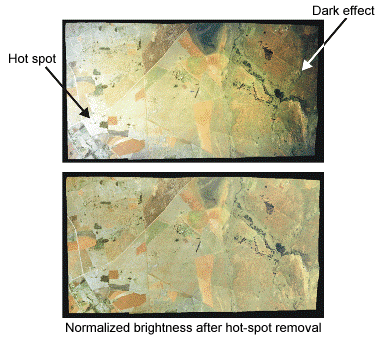
A hot spot is a common distortion in aerial photographs and optical-satellite images. The distortion is caused by solar reflections, which often appear circular in photographs, as shown in the following figure, and tend to appear as a striped pattern in optical-satellite images.
Hot spot normalization removes distortion from aerial and optical-satellite images. It normalizes the brightness over the image by fitting a Gaussian surface to the brightness values. Hot spot normalization does not remove smaller spot reflections from lakes, cars, and buildings.
Adaptive Filter
Use Adaptive filter normalization with images that have a large, irregular bright-and-dark pattern that cannot be modeled to a Gaussian surface. Patterns that model to a Gaussian surface are better handled by Hot spot.
Adaptive filter normalization adjusts the brightness and contrast over local areas, thereby improving image detail, while reducing the bright-and-dark pattern over the entire image. It applies an adaptive enhancement using a moving window to calculate the adjustment for each pixel value. The filter calculates the mean and standard deviation of the gray levels within the window and adjusts the values to match the overall mean and standard deviation in the image. The mean is used to adjust the brightness and the standard deviation is used to adjust the contrast.
The size of the window will affect the results of the filter. Using a window that is too large will not correct the pattern and using a window that is too small will exaggerate the contrast, causing a "wormy" effect.