Most raster (image) formats consist of a rectangular grid of pixels. However, some formats support raster rotation, which can display the raster rotated to a particular position; typically, with north at the top of the viewer. Formats, such as PCIDSK (.pix), GeoTIFF, MrSID and JPEG2000 support rotations of the image. TIFF (with .tfw), JPEG (with .jpw), BIP (with .biw), BIL (with .blw) and NITF (with .niw) support rotations with an associated world file. Other formats may support rotations with an associated PCI Geomatics .pox file.
When you open a raster that contains a rotation, you are prompted to select whether to display the raster as a rectangular grid (raster up) aligned with the area or with the rotation from the file (north up).
With North Up selected, the rotated raster opens as any other raster. In the view pane, the raster may appear turned in the area, since it has been corrected so north is at the top of the viewer.
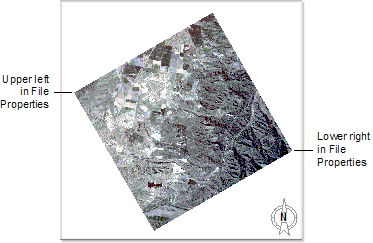
With Raster Up selected, the area is rotated to counteract the effect of the rotation in the file so that the first pixel in the data is in the top left corner. In the view pane, the raster is displayed squared to the area.
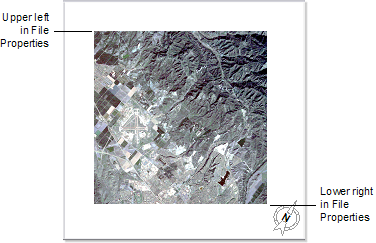
When you create a map with a rotated area (raster up), two surround elements are affected: grid and north arrow. You cannot create a grid in a rotated area. When you create a north arrow in a rotated area, the north arrow will be rotated by the amount set in the area properties.