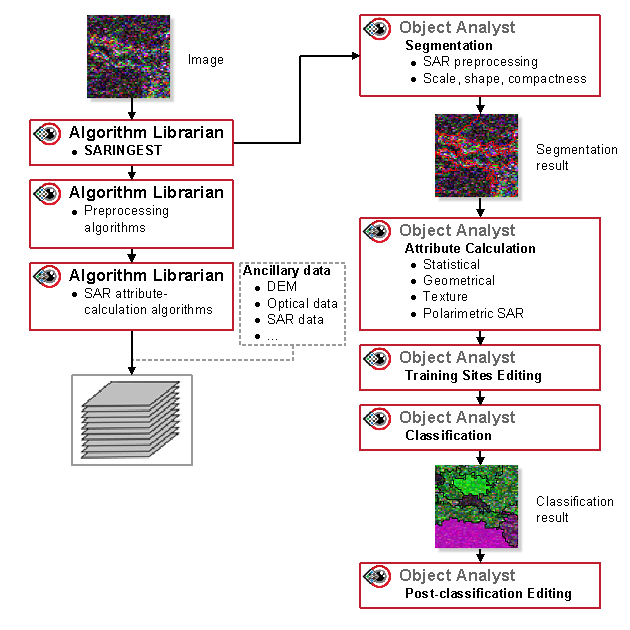
With Object Analyst, many of the predefined attribute types are only a subset of what you can calculate. That is, you can calculate the same subset of attributes and more by using various CATALYST Professional algorithms, many of which are available in the Focus Algorithm Librarian.
In scenario 2, you segment the image the same as in scenario 1. However, in Attribute Calculation, you can use data that has been preprocessed externally to Object Analyst. This can include synthesizing new channels in power, generating additional texture channels, or generating layers for change-detection analysis.
The following table provides information about additional external preprocessing you can do by running CATALYST Professional algorithms.
| Category | Subcategory | Algorithm | Python | EASI | Focus/Modeler |
|---|---|---|---|---|---|
| Data preprocessing | SAR-speckle filtering and noise reduction | FAV |

|
|
|
| FEFROST |
|
|
|
||
| FELEE |
|
|
|
||
| FFROST |
|
|
|
||
| FGAMMA |
|
|
|
||
| FKUAN |
|
|
|
||
| FLE |
|
|
|
||
| FTOUZI |
|
|
|
||
| PSBOXCAR |
|
|
|
||
| PSPOLFIL |
|
|
|
||
| Conversion utilities | PSCONF |
|
|
|
|
| PSIQINTERP |
|
|
|
||
| Scaling | SCALE |
|
|
|
|
| Attribute calculation | Texture | SARTEX |
|
|
|
| TEX |
|
|
|
||
| Synthesize new channels in power | PSPOLSYN |
|
|
|
|
| PSPOLSYNC |
|
|
|
||
| PSPOLSYNR |
|
|
|
||
| PSTOTPOW |
|
|
|
||
| Polarimetric decompositions | PSEABA |
|
|
|
|
| PSFREDUR |
|
|
|
||
| PSG4U2 |
|
|
|
||
| PSTOUZIDEC |
|
|
|
||
| Compact polarimetry | PSCOMDEC |
|
|
|
|
| PSCOMDIS |
|
|
|
||
| PSCOMPACT |
|
|
|
||
| PSCONF |
|
|
|
||
| PSRECONS |
|
|
|
||
| PSS2C |
|
|
|
||
| Change detection | CCDINTEN |
|
|
|
|
| CCDPHASE |
|
|
|
||
| CCDWISH |
|
|
|
With attribute calculation, you can use other SAR imagery or ancillary data, such as spectral bands from optical data, vegetation indices, digital elevation models (DEM) or digital surface models (DSM). That is, there is no requirement that you use the same SAR image for Attribute Calculation as the one you used for Segmentation.
After you generate all the necessary attribute layers, you can specify one or more as the source channels during Attribute Calculation. You can then compute the statistical attributes (mean, minimum, maximum, standard deviation) for each object.
The following figure shows the workflow of using the same SAR image or additional images for Segmentation and Attribute Calculation.