Parameter descriptions
Source Folder
The path and name of the folder containing reference imagery to include in the index files. Subfolders are included in the search.
This parameter is mandatory.
Search Pattern
The search pattern to use when scanning the folder of reference imagery.
For example, to search PCIDSK files, you can specify *.pix, or to search .TIFF (or .tif) files, you can specify *.tiff or *.tif, as applicable. You can also combine two or more patterns separated by a comma, such as *.pix, *.tif.
Overwrite Results
Select this check box to overwrite the existing output files, if any exist. If this check box is left clear, and an output file exists in the relevant folder, the status of the job displays a message informing you of the existence and name of the output file. The message is also written to the event log of the job.
Indexing Method
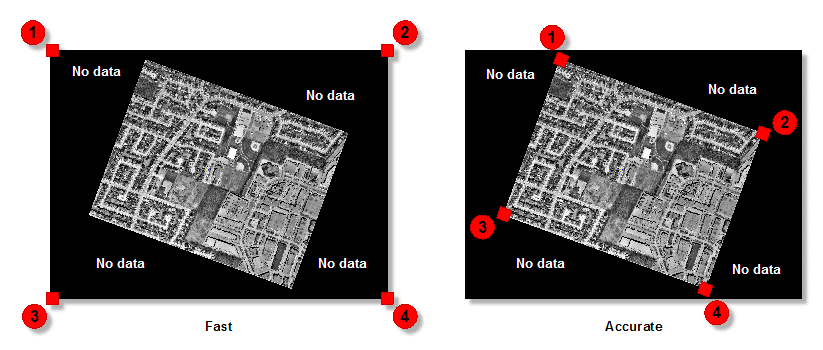
There are two options available for indexing: Fast and Accurate. With the Fast option selected, the four corners of the scene are detected, including areas where there is no data. This option performs indexing the fastest. With the Accurate option selected, the system attempts to find the inner four corners where data exists, and excludes most of the no-data area.
When indexing orthos that have no-data values in the corners, choosing the Accurate option is recommended, though it takes longer than the Fast option.
Stored Path Type
- Relative: stores the relative path in the attribute table of the vector segment created.
- Absolute: stores the absolute path in the attribute table of the vector segment created.
The benefit of using a relative path is that you can move the index along with the images to another folder or computer, and the files are still be recognized. With an absolute path, the exact path of the image must always exist.
Horizontal Accuracy
The horizontal accuracy of a given pixel in the reference image data. Units for this value are the same as the map units of the source files.
For example, X,Y defines the coordinates of a specific pixel in the reference-image data. However, because there is always some margin of error in image data, the eX and eY coordinates define the level of horizontal accuracy in the reference imagery.
The specified accuracy levels are included as ORTHO_X_ACCURACY and ORTHO_Y_ACCURACY metadata tags in the output index file. These tags are read and interpreted by other CATALYST Enterprise modules.