Parameter descriptions
DEM Folder
The path and name of the folder containing tiled digital elevation models (DEMs) to include in the index files ( index.pix and index.txt ).
This parameter is mandatory.
Search Pattern
The search pattern to use when scanning the folder of reference imagery.
For example, to search PCIDSK files, you can specify *.pix, or to search .TIFF (or .tif) files, you can specify *.tiff or *.tif, as applicable. You can also combine two or more patterns separated by a comma, such as *.pix, *.tif.
Include Subfolders
Select this check box to include subfolders in the search.
Overwrite Results
Select this check box to overwrite the existing output files, if any exist. If this check box is left clear, and an output file exists in the relevant folder, the status of the job displays a message informing you of the existence and name of the output file. The message is also written to the event log of the job.
Indexing Method
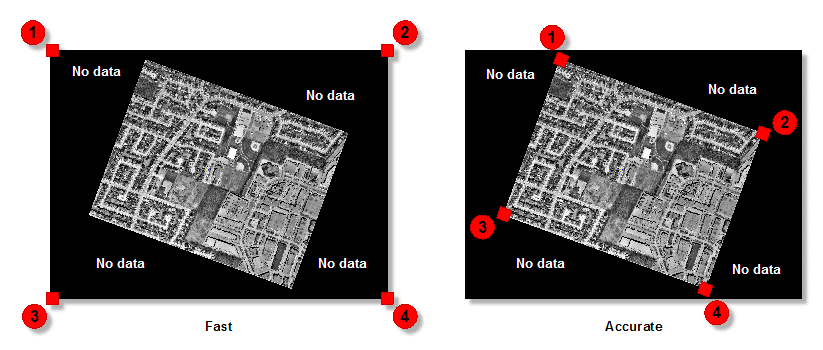
There are two options available for indexing: Fast and Accurate. With the Fast option selected, the four corners of the scene are detected, including areas where there is no data. This option performs indexing the fastest. With the Accurate option selected, the system attempts to find the inner four corners where data exists, and excludes most of the no-data area.
When indexing orthos that have no-data values in the corners, choosing the Accurate option is recommended, though it takes longer than the Fast option.
Stored Path Type
- Relative: stores the relative path in the attribute table of the vector segment created.
- Absolute: stores the absolute path in the attribute table of the vector segment created.
The benefit of using a relative path is that you can move the index along with the images to another folder or computer, and the files are still be recognized. With an absolute path, the exact path of the image must always exist.
Create Index PIX
Select this check box to have the job create a file named index.pix. The index.txt is always created.
Elevation Channel
The image channel that contains the DEM data to include in the index. If no value is specified, channel 1 is used as a default.
Background Elevation
The pixel value representing background elevation (pixels where no elevation value is present) in the input digital elevation model (DEM).
If no value is specified for this parameter, the module checks for ELEVATION_BACKGROUND or NO_DATA_VALUE metadata tags, first at the channel level, and then at the file level. If a value is neither specified nor found in the metadata, the default value of -32768 is used for 16S and 32R data, 65535 for 16U, and 0 for 8U.
Elevation Reference/Datum
The vertical reference for the elevation values in the source digital elevation model (DEM), or for the constant value of the Elevation Offset and Elevation Scale parameters, when available, and specified.
Available values are as follows:
- Mean Sea Level: Elevations are referenced to mean sea level (MSL). The EGM2008 geoid model is used to convert the elevations to ellipsoidal heights.
- Ellipsoid: Elevations are referenced to the ellipsoid. The coordinate system of the DEM raster file is examined to determine which ellipsoid and datum to use. For example, if the DEM file is referenced to NAD83, the heights are assumed to be NAD83 ellipsoidal heights. If the DEM and math model are based on different coordinate systems, the heights are converted automatically to the math-model coordinate system before use.
- Automatic: Select this option when you want the module to automatically determine the elevation reference based on your input data.
Elevation Unit
The unit for the elevation values in the source digital elevation model (DEM).
Available values are as follows:
- Meter: Elevation values are represented in meters.
- Feet: Elevations values are represented in International feet.
- Automatic: Select this option when you want the module to automatically determine the elevation unit based on your input data.
Elevation Scale
The elevation scale used by the digital elevation model (DEM).
If no value is specified for this parameter, the module searches for an ELEVATION_SCALE metadata tag at the file level, then again at the channel level of the input DEM. If a value is neither specified nor found in the metadata, a default value of 1.0 is used, indicating that the scale is one to one.
Elevation Offset
The elevation offset used by the digital elevation model (DEM).
If no value is specified for this parameter, the module searches for an ELEVATION_OFFSET metadata tag at the file level, and then again at the channel level of the input DEM. If a value is neither specified nor found in the metadata, the offset defaults to 0.0, indicating that there is no offset.
Vertical Accuracy
The vertical accuracy or uncertainty for each pixel in the specified DEM. Units for this value are the same as those specified for the DEM Units parameter.
For example, for a given pixel in the DEM, the elevation is 25 meters above mean sea level (MSL), but plus or minus five meters. In this case, the vertical accuracy is 5 meters; the true value of the selected pixel ranges from 20 meters through 30 meters.
The accuracy of the DEM is stipulated typically with the DEM. For example, Landsat imagery is available freely online, with the stipulation that the data is accurate 90 percent of the time; its vertical accuracy is 23 meters.
The specified accuracy levels are included as ORTHO_X_ACCURACY and ORTHO_Y_ACCURACY metadata tags in the output index files. These tags are read and interpreted by other CATALYST Enterprise modules.
This parameter is optional.