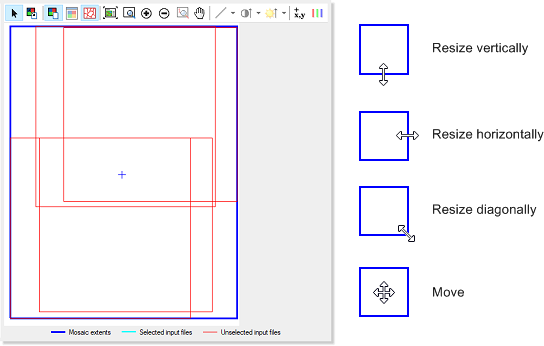
In the view pane, the box with the dark-blue outline, known as the Mosaic extents box, as shown in the following figure, defines the extents of the mosaic file. You can set the extents either by entering values in the relevant boxes in the leftmost pane of the window, or interactively in the view pane by, on the Define Mosaic Extents toolbar, clicking Define Mosaic Extents, and then resizing or moving the box, as necessary. By default, the bounds of the mosaic area are the maximum extents of your image data set.
Figure 1. View pane, mosaic extents, and mouse pointers
Finally, you select the georeferencing system to use, the bounds, and, if necessary, modify the coordinates.
To modify the extents
-
Do one of the following:
- To define the extents from a file, click Define from File, and then select the file you want.
- To manually define the extents, type the dimensions of the mosaic in the boxes beside Mosaic size, and then type the pixel size you want to use in the boxes beside Pixel size according to the units of the selected coordinate system for the projection.
- To interactively define the extents, on the Define Mosaic Extents toolbar, click Define Mosaic Extents, and then resize or move the box, as necessary.
- Proceed to Setting the projection.