You can set the number of columns, column spacing, and RepCode for an index.
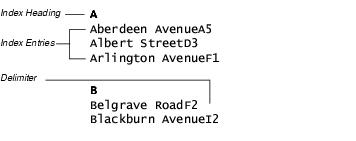
Changing headings, entries, and delimiters in the RepCodes area of the General page.
-
On the toolbar, click Map View Mode.
Note: The image must be in Map View Mode for the Indexation window to be accessible.
- From the Maps tree, right-click an Area and click Indexation.
- In the Indexation window, click the General tab.
- Enter a value that represents the number of index columns in the Number of columns spin box.
- Enter a value that represents the width of the index columns in the Column width spin box.
- Enter a value that represents the spacing between columns in the Inter-column spin box and choose a unit of measurement from the list box.
- Enter a value that represents the spacing between items in the index in the Inter item spin box.
-
In the Repcode area, enter a code in any of the following boxes:
- Index Item
- Headings
- Delimiter
- Index Border
- Click OK.
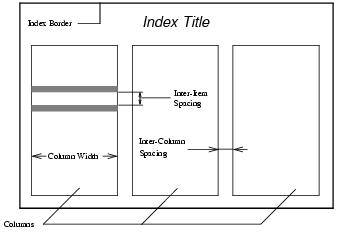
Change these parts of an index with the Indexation properties window