GREY2RGB
Greyscale to RGB Color Mapping
Description
GREY2RGB converts greyscale raster channels into RGB images using a colormap. The output RGB image retains the same projection and spatial resolution.
Parameters
grey2rgb(mfile, dbic, colormap, inmin, inmax, clampmet, numbin, filo)
| Name |
Type |
Caption |
Length |
Value range |
| MFILE * |
str |
Name of input file, folder, or text file |
1 - |
|
| DBIC |
List[int] |
Input raster channels |
0 - 1 |
Default: 1 |
| COLORMAP |
str |
Name of color map to apply |
0 - |
Default: jet |
| INMIN |
List[float] |
Min Input Value |
0 - 1 |
|
| INMAX |
List[float] |
Max Input Value |
0 - 1 |
|
| CLAMPMET |
str |
Method for clamping out of range values |
0 - |
NODATA | CLAMP
Default: CLAMP |
| NUMBIN |
List[int] |
Number of bins for input histogram |
0 - 1 |
1 - |
| FILO |
str |
Name of output file or folder |
0 - |
|
* Required parameter
Parameter descriptions
MFILE
The name of an image file, a folder, or a text file that contains the input images to process.
For information about basic use of an MFILE with CATALYST Professional algorithms, see Using an MFILE with a CATALYST Professional algorithm.
The MFILE text file format for GREY2RGB is INPUT_FILENAME;DBIC;OUTPUT_FILENAME.
- INPUT_FILENAME is the name of the input file.
- DBIC is an optional parameter to specify the input channel to use for this file (overrides the PPF's DBIC parameter).
- OUTPUT_FILENAME is an optional parameter to specify the output filename to create.
DBIC
Specifies the input channel to be colorized. All channel types are supported. Complex channels (C32R, C16S) will be converted to intensity before applying the selected colormap.
COLORMAP
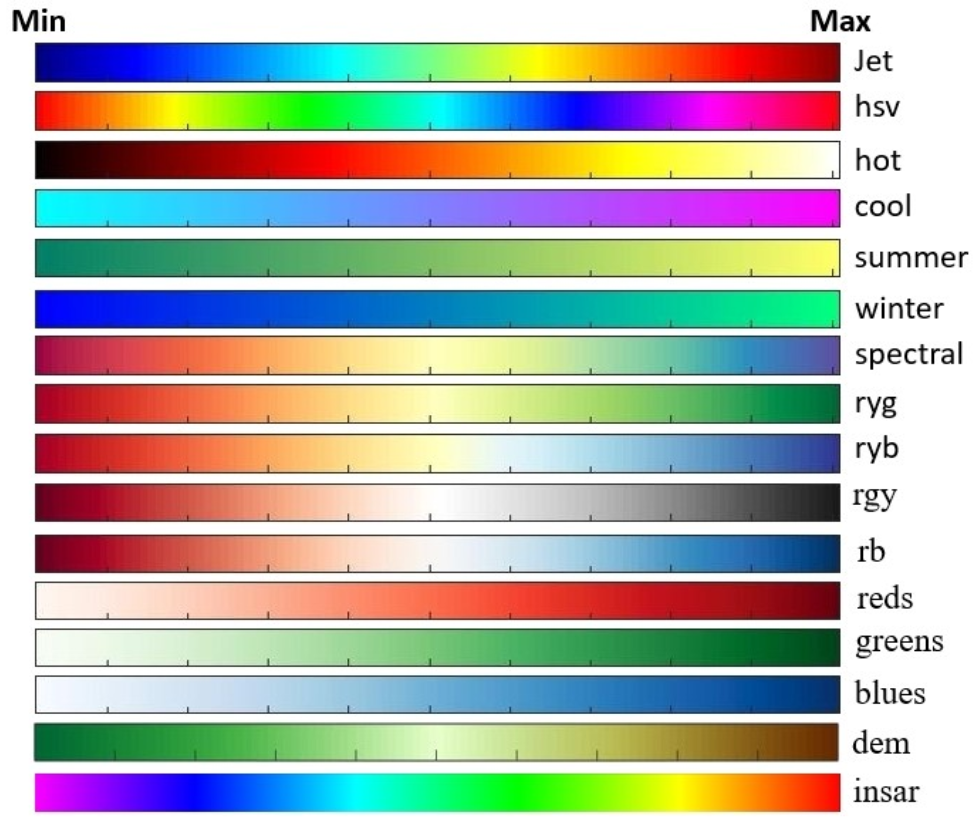
The colormap to apply to the input greyscale channel (DBIC) to get the output RGB image.
The following colormaps are defined:
- jet, hsv, hot, cool, summer, winter, spectral, ryg (red-yellow-green), ryb (red-yellow-blue), rgy (red to gray), rb (red to blue), blues, greens, reds, dem, insar.
- jet_inv, hsv_inv, hot_inv, cool_inv, summer_inv, winter_inv, spectral_inv, ryg_inv (red-yellow-green), ryb_inv (red-yellow-blue), rgy_inv (red to gray), rb_inv (red to blue), blues_inv, greens_inv, reds_inv, dem_inv, insar_inv.
Run with '?' to list valid colormap options.
Custom colormap files can be created and installed into the <install-dir>/etc/color_tables directory. Simply create a text file in one of two formats:
- A list of r g b values between 0 and 1. The colors of the colormap will be equally spaced and interpolated.
- A list of x r g b values where the x values can take any value and the r g b values are between 0 and 1. The colors of the colormap will be defined at the corresponding x values and interpolated.
INMIN
The minimum value to be mapped in the colormap space to get the output RGB image.
If INMIN is blank, the 0.5 percentile of all the input data will be used. This is equivalent to generating a histogram of all the data and then doing a 0.5% tail trim on the bottom end.
INMAX
The maximum value to be mapped in the colormap space to get the output RGB image.
If INMAX is blank, the 99.5 percentile of all the input data will be used. This is equivalent to generating a histogram of all the data and then doing a 0.5% tail trim on the top end.
CLAMPMET
Option to apply to the values of the input raster channel that are outside the INMIN and INMAX values.
When CLAMPMET=CLAMP, all numerical values lower or greater than INMIN and INMAX are respectively assigned to the first and last colors of the selected colormaps.
When CLAMPMET=NODATA, all numerical values less than or greater than INMIN and INMAX are assigned to NoData in the output 8-bit (8U) RGB image.
NUMBIN
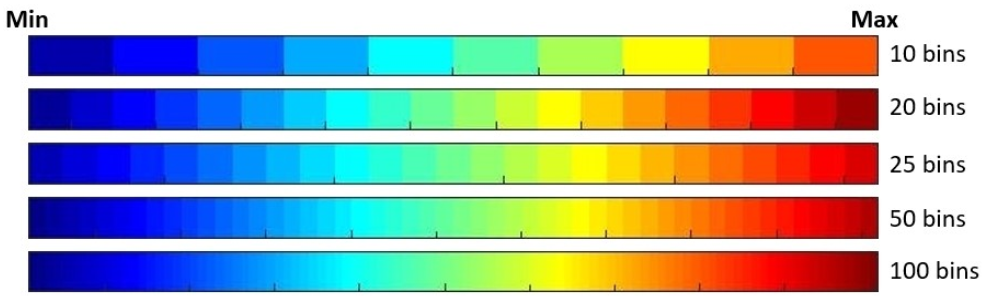
The number of bins are used to control how many colors from the selected colormap are used for the greyscale to RGB transformation.
A high number of bins offers a continuous visual appearance while a low number of bins offers a "classification like" visual appearance.
If blank, the algorithm will not histogram the data and will instead interpolate all color values in the colormap.
FILO
The name of the PCIDSK file to be created to contain the RGB image after applying the colormap. The output file will consist of 3 x 8U channels.
The output file projection, dimensions and spatial resolution are the same than the input file. All file metadata and segments (such as GCPs, text, orbit, incidence angle array and binary math model) are transferred to the output file.
Return Value
Returns: Program execution status
Type:
PCI_INT
The return value is 0. This function returns only if it runs successfully; otherwise, it throws an exception.
|
Details
GREY2RGB converts single greyscale raster channel into an RGB image using a colormap. The output RGB image retains the same projection and spatial resolution. GREY2RGB is useful to enhance biophysical variables such as vegetation or biomass indices and other mathematical parameters such as InSAR pair coherences, InSAR deformation maps or polarimetric decomposition parameters (alpha and beta angles, entropy, etc).
GREY2RGB is also useful to represent images from a time series with a common colormap and a fixed color scale.
Examples
Process all .pix files in inputs/ into a consistently colored set of output images in outputs/.
from pci.grey2rgb import grey2rgb
mfile="inputs/*.pix"
dbic=[1]
colormap="hsv"
inmin=[]
inmax=[]
clampmet="clamp"
numbin=[]
filo="outputs/"
grey2rgb(mfile, dbic, colormap, inmin, inmax, clampmet, numbin, filo)
Process a single .pix file into a colored image.
from pci.grey2rgb import grey2rgb
mfile="input.pix"
dbic=[1]
colormap="hsv"
inmin=[]
inmax=[]
clampmet="clamp"
numbin=[]
filo="output.pix"
grey2rgb(mfile, dbic, colormap, inmin, inmax, clampmet, numbin, filo)
Run GREY2RGB with the following mfile text file
mfile.txt:
          workdir1/output.pix;;colorized/output1.pix
          workdir2/output.pix;;colorized/output2.pix
Discretize the output into 10 colors sampled from the jet_inv colormap to form a classified-looking image.
from pci.grey2rgb import grey2rgb
mfile="mfile.txt"
dbic=[1]
colormap="jet_inv"
inmin=[-1]
inmax=[1]
clampmet="clamp"
numbin=[10]
filo=""
grey2rgb(mfile, dbic, colormap, inmin, inmax, clampmet, numbin, filo)
Algorithm
GREY2RGB converts single greyscale raster channel into a RGB image using a colormap. The output RGB image retains the same projection and spatial resolution. GREY2RGB is useful to enhance biophysical variables such as vegetation or biomass indices and other mathematical parameters such as InSAR pair coherences, InSAR deformation maps or polarimetric decomposition parameters (alpha and beta angles, entropy, etc).
GREY2RGB is also useful to represent images from a time series with a common colormap and a fix color scale.
GREY2RGB offers a set of 16 standard colormaps with jet being the default (figure 1).
The number bins is used to control how many colors of the selected colormap are used for the greyscale to RGB transformation. A high number of bins offers a continuous visual appearance while a low number of bins offers a "classification like" visual appearance (figure 2).
© PCI Geomatics Enterprises, Inc.®,
2026. All rights reserved.