Details
SARINGESTAOI imports and calibrates SAR datasets into the PCIDSK (*.pix) format. Optionally, SARINGESTAOI can import an image subset by specifying an area of interest (AOI) via a maskfile in geocoded vector format, or a raster window (DBIW) specified in image co-ordinates (columns and lines). In addition to ingesting the raster data, SARINGESTAOI stores metadata and creates auxiliary segments (orbit, math model, GCPs, incidence angle array, etc.) that are necessary for further processing.
AOI projection and SAR image geometry
SARINGESTAOI can ingest a subset of a SAR image based upon user specified areas of interest (AOI). The AOI maskfile must contain closed vector polygons stored in the specified mask layer.
No output is written if the polygon(s) contained in the AOI do not overlap with the SAR image.
Various combinations of AOI mask projection, SAR acquisition geometry, availability of a math model and the availability of a DEM have an impact on the geolocation accuracy of the ingested area as described in the following scenarios.
- An AOI derived from an external source with a precise geolocation and in the ortho space, for example ortho or orthomosaics from aerial photography or spaceborne optical or SAR imagery.
- An AOI derived from a raw vendor SAR image displayed using the file georeferencing.
- An AOI derived from a raw vendor SAR image displayed using a math model.
When a RAW vendor SAR image is opened in CATALYST Professional using its key file name, one can display the image using file georeferencing or a math model.
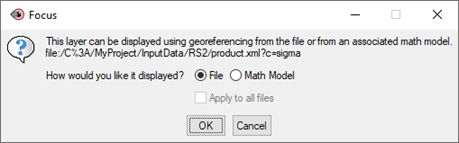
Figure 1
The georeferencing information utilizes the nominal locations of the four corners of the image and assumes equally spaced pixels in the given coordinate system, likely in Latitude and Longitude or UTM. For most recent sensors at processing levels 1A (SLC) and 1B (GRD), CATALYST Professional produces a precise math model (or RPCs) generated from the satellite state vectors provided in the metadata. A math model defines relationship between image co-ordinates (2D) and their geodetic locations (3D).
SARINGESTAOI has been designed to use the SAR file math model (if available) and a DEM to reproject the external AOI (scenario 1) to the image slant range or ground range geometry before ingesting the data. If the math model or the DEM is missing, the ingested area will not correspond to the expected area from the AOI. The shift will be particularly noticeable for areas of rugged terrain or data sets covering large swath widths such as ScanSAR data or Sentinel-1 in IW or EW modes.
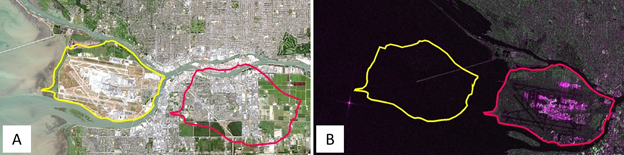
Figure 2. (A). A Landsat-8 ortho image was used to draw an AOI in the ortho space (in yellow). (B) The same area in the slant range geometry of a Sentinel-1B IW-SLC image for a descending orbit. The file georeferencing is shifted approximatively 7 km to the east compared to the ortho space. In red is the projected area of interest when the math model and a DEM are used to ingest a subset of the original scene.
Note that displaying a SAR image in FOCUS using its Math Model and a DEM will create an orthoimage "on the fly". Therefore, any vector AOI derived from this model (scenario 3) will be the equivalent of an external AOI (scenario 1).
When a vector AOI is created under scenario 2 but no DEM is provided, SARINGESTAOI will not attempt to reproject the AOI and the ingested area will correspond to the correct AOI location. However, if this AOI file is reused to ingest another SAR image, a shift will occur.
Using a DEM and an AOI derived from an ortho space allows reuse of the AOI to ingest the exact same geographical area for a series of SAR images from different sources, with different dimensions, spatial resolution, orbit direction, etc. Drawing an area of interest using the file georeferencing will only be precise for that image.
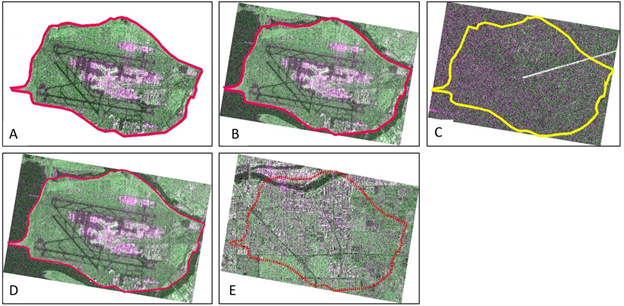
Figure 3. (A) The ingested subset when FILLOP="NODATA". (B) The ingested subset when FILLOP="BOX". (C) The ingested area when a math model is available, but no DEM is specified. The AOI in the ortho space is not reprojected to the slant range geometry. (D) The AOI defined in the slant range geometry of a Sentinel-1B IW-SLC image for a descending orbit. The expected area is correctly ingested if no DEM is provided. This AOI will only be accurate for this scene. (E) The same AOI in slant range but reprojected using a DEM. The ingested area corresponds to a region situated approximatively 7 km east of the expected area.
SAR image, AOI and DEM spatial extents
Parts of the AOI can be outside the spatial extents of the SAR image. However, if the FILEDEM parameter is specified, the AOI must be completely within the DEM's spatial extents. The DEM must not contain NODATA values for the area covered by the AOI.
Metadata
In addition to image and segment data, the SARINGESTAOI extracts metadata related to SAR processing and writes it to the output file. There are two levels of metadata: file and channel.
At the file level, SAR metadata contains information that relates to the data set as a whole, including:
- Acquisition_DateTime: Date and time of acquisition using the Universal Time (UT) standard (YYYY:MM:DDThh:mm.ss.xxx). (e.g. 2019-11-01T10:01:26.61798727795Z)
- Acquisition_Type: Optional detailed information related to the image observation mode (ScanSAR, Spotlight, StripMap, ...), processing level (SSC, SLC, GRD, ...) and beam mode (Fine, IW, EW...). The content of this metadata varies according to the supplied information and naming conventions uses by the data providers.
- IncidenceFarAngle: Incidence angle, in degrees, at the swath far range
- IncidenceNearAngle: Incidence angle, in degrees, at the swath near range.
- LookDirection: Right or Left. Pointing direction of the sensor relative to the orbit direction (Ascending or Descending).
- Matrix_Type: Matrix stored on file; for example, s4c or c2r
- OrbitDirection: Ascending or Descending
- Polarizations: List of polarizations of the data in the image; for example, HH, HV. Each polarization is represented by two characters. The first character specifies the transmit polarization, the second specifies the receive polarization.
- Product_Type: Imported data product corresponding to the processing level for example, SLC, MLC, GRD, SSC, EEC, L1A, L1B, L1C, L1D, ...
- RadarBand: Radar band corresponding to the wavelength (X, C, L, P, ...)
- RadarCenterFrequency: Radar center frequency given in hertz (hz)
- RadarWavelength: Radar wavelength given in meters (m.)
- SensorModelName: Description of the sensor; for example, RADARSAT-2
For Single Look complex (SLC) data:
- SlantRangeFarEdge: Distance between the sensor and the far edge of the swath, in meters (m), in the slant range geometry.
- SlantRangeNearEdge: Distance between the sensor and the near edge of the swath, in meters (m), in the slant range geometry.
- SlantRangeInterval: For every image pixel in the range direction, the incremental slant range distance in meters (m).
At the channel level, metadata for polarimetric data identifies the matrix element stored in the channel:
- Matrix_Element: Describes the row and column position of the element in the matrix. For example, with a data set stored as an s4c matrix, the first channel is identified as _1_1 and the second channel is identified as _1_2.
- Polarization: Polarization of the channel. Each polarization is represented by two characters. The first character specifies the transmit polarization, the second specifies the receive polarization. For example: HH, HV, VH, VV, RR, LL, RH, RL etc.
These metadata, in particular the matrix type, are particularly important for advanced SAR processing such as SAR polarimetry, SAR compact polarimetry, SAR Interferometry and SAR coherent change detection. They determine which process can be applied to a particular dataset. For more information about matrix type, see the PSCONV documentation.
Channel type and image segments
Single look complex (SLC) and multilook complex (MLC) data are stored as complex channels identified by the following codes:
- C16S: Complex 16 bit signed for uncalibrated data
- C32R: Complex 32 bit for calibrated data (sigma, gamma or beta nought).
Complex data are stored as a single channel and are not stored as separate channels (generally known as the Real (I) and Imaginary (Q) channels). Other segments that may be created include the following:
- [GCP] Ground Control Points. GCPs provided by the data vendor, generally a grid of GCPs derived from orbital data.
- [ORB] Orbit segment describing the position of the satellite during the data acquisition.
- [BIN] Binary segment. Rational Functions Model (or rational polynomial coefficient (RPCs)). Math model describing in ground coordinates the location of every pixel in an image. This information is derived from the satellite state-vectors. This segment is generally computed by CATALYST Professional and not directly imported from the data vendor.
- [ARR] Incidence Angle Array. 1D array describing the incidence angle for every column in the range direction.
In general, older sensors (such as ERS-1/2, Radarsat-1, ALOS Palsar-1, ENVISAT-ASAR) rely on a nominal sensor model for positioning and orthorectification while a binary math model is generated for newer sensors