Parameter descriptions
Input: Input image channels or layers
The input channel list of raw images used to create epipolar images.
InputMM: Input math-model segment
The number of the segment in the input file that contains the math model for the raw images.
OutputLeft: Output left-epipolar-image layer
The output raster layer for the left epipolar image.
OutputLeftMM: Output left-math-model layer
The output math-model layer in which to store the computed model for the left image.
OutputLeftHeader: Output left-epipolar header
The output epipolar-header layer in which to store the header file for the left image.
OutputRight: Output right-epipolar-image layer
The output raster layer for the right-epipolar image.
OutputRightMM: Output right-math-model layer
The output math-model layer in which to store the computed model for the right image.
OutputRightHeader: Output right-epipolar header
The output epipolar-header layer in which to store the header file for the right image.
Input window
Specifies the raster window (x-offset, y-offset, x-size, y-size) of data to read from the input channels.
If no value is specified for this parameter, the entire image is processed. XOff and YOff define the upper-left starting pixel coordinates of the window. XSize is the number of pixels that define the window width. YSize is the number of lines that define the window height.
Source background options
Specifies, potentially with the Source Background Values parameter, which pixels in the source image are to be considered background (NoData) pixels. In general, if a pixel is considered NoData, EPIPOLAR processes the pixel in a specific manner.
- File metadata: reads the NoData value from the input file's NO_DATA_VALUE metadata. The file-level metadata tag is used as the default for each channel; channel-level tags, when available, override the default. When metadata does not exist, each pixel in the input is considered valid.
- 0: each pixel, in each channel, having a value of zero is considered NoData
- None: each pixel, in each channel, is considered valid
- Specify values: each pixel, in each channel, having the value or values specified in the Source Background Values parameter is considered NoData
- File metadata, else specify values: same as the File Metadata option, but uses the values specified for the Source Background Values parameter to define the NoData value for each channel when metadata does not exist.
For specific examples, see the Source Background Values parameter.
Source-background values
- Specify values
- File metadata, else specify values
- File metadata, 0: uses file-level metadata. When metadata is unavailable, pixels that have a value of zero are considered NoData.
- 255: each pixel, in each channel, that has a value of 255 is considered NoData
Epipolar Pair Selection Method
The method used to form the epipolar pairs. If no value is specified for this parameter, the Pair option is used by default.
-
PAIR: automatically forms pairs according to the order in which the files are listed in the input MFILE or in the input folder. No other processing or screening of images is performed.
For example:- File 1 uses the left image for pair 1
- File 2 uses the right image for pair 1
- File 3 uses the left image for pair 2
- File 4 uses the right image for pair 2
-
MAXIMUM: for each image, a single stereopair is generated using the image that provides the highest amount of overlap. Use the MINPC (Minimum Overlap Percent) parameter to specify the minimum percentage of overlap required to create a pair for consideration.
-
ALL: for each image, stereopairs are generated using all images that overlap above the minimum percentage specified in the MINPC (Minimum Overlap Percent) parameter.
-
OPT: stereopairs are generated to cover the entire project area, but an attempt is made to eliminate excessive duplication. The minimum-percentage value of the MINPC parameter is ignored with this method. Before pairs are selected, the images are assigned to contiguous flightlines, and only pairs of images from the same flightline are considered, to eliminate side overlaps. The OPT selection method is intended for use in processing airborne images, where the concept of flightlines is well defined.
-
DENSE: stereopairs are generated to cover the entire project area, with every image used exactly twice: as a left image and a right image of adjacent pairs. The minimum-percentage value of the MINPC parameter is ignored with this method. Before pairs are selected, the images are assigned to contiguous flightlines, and only pairs of images from the same flightline are considered, to eliminate side overlaps. The DENSE selection method is intended for use in processing airborne images, where the concept of flightlines is well defined.
-
STRIPS: The STRIPS selection method uses the same concept as the DENSE selection method. But it groups the images into flight lines using their geographic data extents. The STRIPS selection method will only give good results if the flight lines are straight and parallel to each other.
The STRIPS method allows up to two values for the MINPC parameter:- Along-Track-MINPC: this applies between images within a flight line. If ommitted the default value is: 60
- Across-Track-MINPC: this applies between images between different flight lines. If you provide only one value for MINPC, then it applies to the Along-Track-MINPC only and the Across-Track-MINPC is set to 100, effectively turning off across track pairing. This behavior is to maintain backwards compatibility with how the STRIPS method worked before the two values were introduced.
-
AUTO: The AUTO selection method will use the best results from the STRIPS and DENSE selection methods. It will use the selection method that generated the fewest flight lines.
-
PAIR_CONT: automatically forms pairs according to the sequential order in which the files are listed in the MFILE parameter or in the input directory. The user can control the pair selection using minimum percentage overlap (MINPC). This method is intended for the automatic processing in the GXL system.
For example:- Left file 1 uses the first file
- Right file 1 uses the second file
- Left file 2 uses the second file
- Right file 2 uses the third image
For the MAXIMUM, ALL, OPT, and DENSE methods, additional options may be specified in the form of KEY=value. Each KEY=value pair must be preceded by a comma.
The following KEYs and their values are recognized:
-
SSL: Stereo Separation Lower limit in degrees. Stereo separation is defined as the angle between the lines of sight from the centroid of the image-overlap area to the positions of the two cameras or satellites. If SSL is specified, the pairs with stereo separation lower than the provided value are not formed. If the SSL key is not provided or SSL or SSL= by itself is specified, the limit is set at 1 degree. The provided value must be greater than 0 and less than 180 degrees.
-
SSU: Stereo Separation Upper limit in degrees. If SSU is specified, the pairs with stereo separation higher than the provided value are not formed. If the SSU key is not provided or SSU or SSU= by itself is specified, the limit is set at 140 degrees. The provided value must be greater than 0 and less than 180 degrees. If both SSL and SSU are provided, SSL must be lower than SSU.
-
SAR: Specifies SAR-satellite-specific parameters to use in forming SAR epipolar pairs. The parameters are specified by single-letter codes, and can be provided as a contiguous string of letters that does not include the coma. The actual values are extracted from the metadata of each image. Candidate pairs are accepted if all specified SAR parameters match exactly; otherwise, the candidate pairs are rejected. If the SAR option is not provided, no SAR-specific screening is performed before forming epipolar pair candidates.
The following parameters (and the corresponding metadata tags) are recognized:- N: Satellite platform name, given by the tag PlatformName
- L: SAR look direction, given by the tag LookDirection
- O: SAR orbit direction, given by the tag OrbitDirection
- B: SAR beam mode (without beam number), extracted from the tag BeamMode
- P: SAR polarizations, given by the tag Polarizations
- T: Product type, given by the tag ProductType
The SAR key is evaluated only for the MAXIMUM and ALL selection methods. SAR images without the required metadata tags are omitted from further analysis.
If SAR or SAR= by itself is specified, all parameters listed above must be identical for two images to form a pair (that is, the default is equivalent to SAR=NLOBPT). If only a partial list is specified, the parameters included in the list must match for the two images to form a pair, and the parameters not included in the list are ignored. Special forms SAR=ALL and SAR=NONE are also recognized. The NONE option disables all checks, but ensures that only SAR (as opposed to optical) images are used in forming pair candidates.
Note: The pairs accepted according to the criteria provided in the SAR key are still screened according to their stereo-separation criteria defined by the SSL and SSU keys. They must also satisfy the minimum-overlap percentage, as defined by the MINPC parameter.
Minimum overlap (%)
The minimum percentage value of overlap acceptable between two images for them to be considered a valid pair. If no value is specified for this parameter, the minimum-overlap percentage defaults to 50 percent.
The first step in the pairing is to evaluate every pair to determine if the overlap is greater or equal to the value of this parameter. For each image pair, A and B, two overlap values are calculated: A/B and B/A. Pairs are rejected when the minimum of A/B and B/A is less than the value MINPC / 100. The difference between the values A/B versus B/A is larger the more the two image sizes differ.
- A/B is the area of A relative to the area of B
- B/A is the area of B relative to the area of A
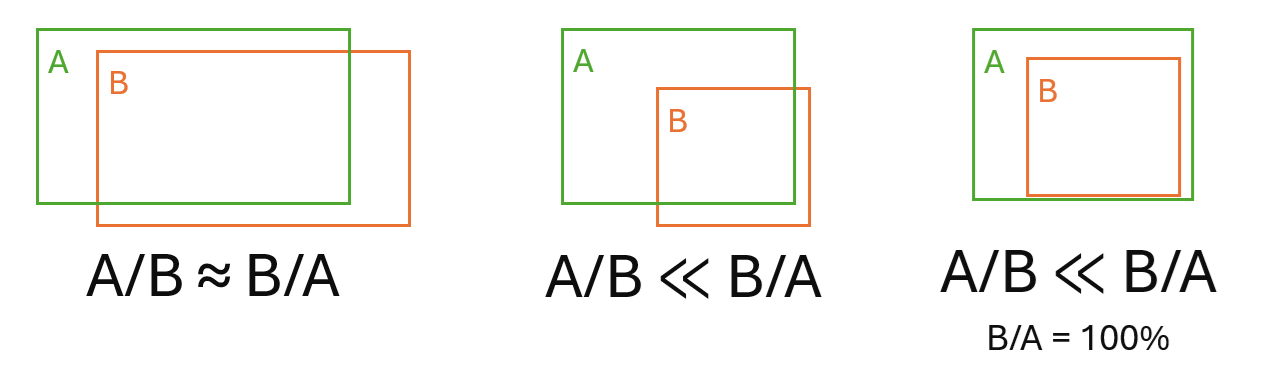
Examples:
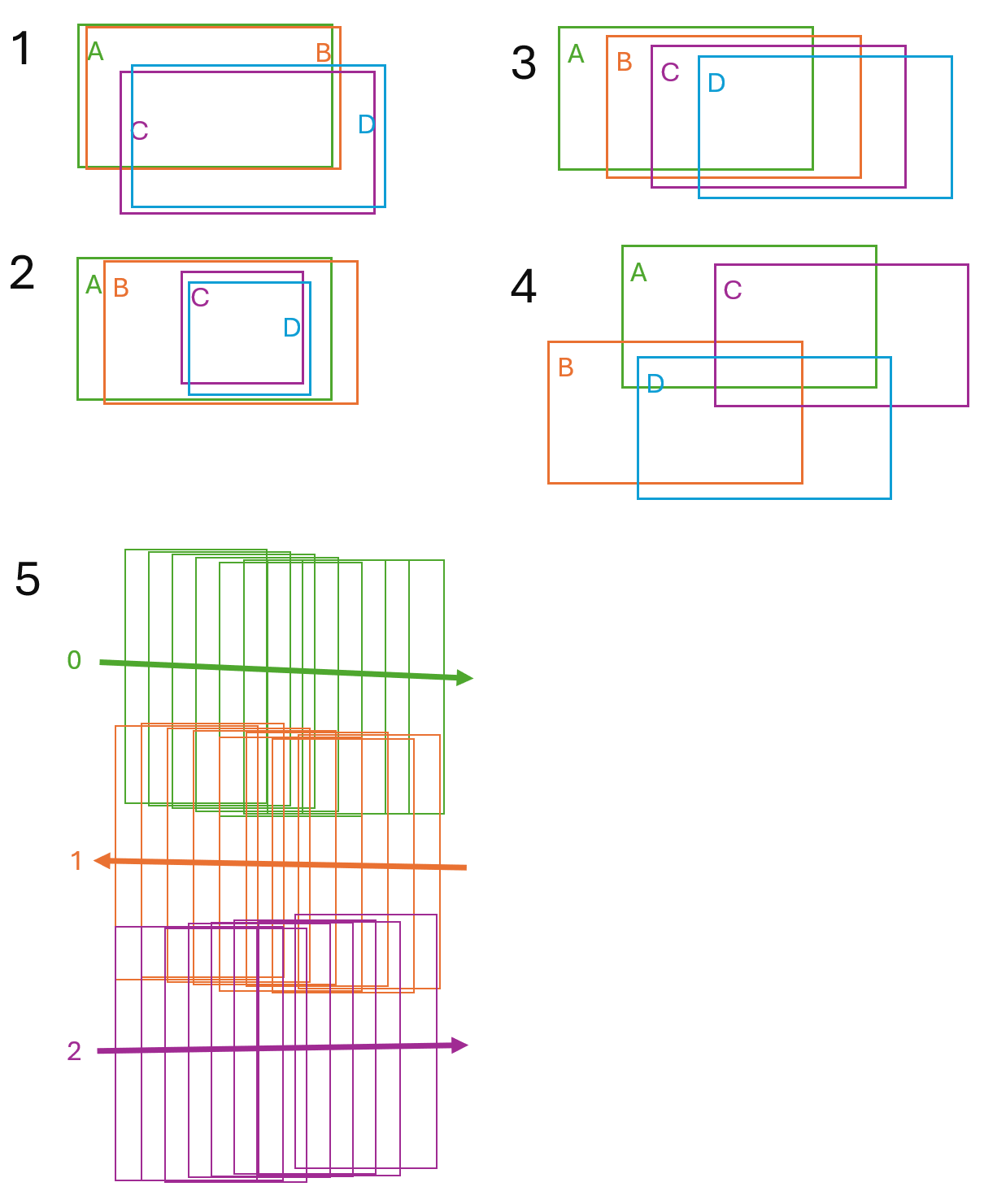
- Stereo image sets - examples 1 and 2: when your data consists of stereo image sets, often forward and backward looking, you want only the stereo images to be paired together. In this case set MINPC to a high value, such as 75 or higher. For this example, the high value accepts the pairs AB and CD, and rejects the pairs AC, AD, BC, and BD.
- Non-stereo image set - example 3: when your data consists of non-stereo image sets, similar to this example, you usually to pair images that are close to one another. In this case the default value value of MINPC is often good. For this example, it produces the pairs: AB, AC, BC, BD, and CD.
- Non-stereo image set - example 4: for random images you want pair images might want to be less restrictive. In this case use a low value for MINPC, such as 40. For this example, it produces the pairs: AB, AC, and BD.
- Strips - example 5: when the images are organized into flight lines (strips) with differing along-track and across-track overlap. In this case use STRIPS SELMTHD wioth two MINPC values, such as 60,20.
Downsampling factor
The downsampling interval for the created epipolar image. This parameter controls the number of pixels that are used from the raw images to generate the epipolar image. The cubic-convolution resampling is performed in converting the two images to epipolar geometry. Unless specified, one pixel is used for downsampling.
Output background
The background (NoData) value to use for epipolar pixels that are not populated. Each channel is set to the same background value. If the value specified for SAR images in decibel scaling is larger than -100.0, it is reset to -100.0. The provided background value will be truncated to the range allowed by the source-image data type.
Flight line break angle
Optionally specifies a flight line break angle, which is used to determine the end of a flight line. The vector angles between image centers are calculated , and if the vector angle between two image center is greater than the break angle threshold the flight line ends, and a new one begins. Default value is 22.5 dgrees.