Parameter descriptions
FILI
The name of the input file.
The file must be GDB-supported type that contains the image data to use in the linear combination.
DBIC
The channel or channels in the input file to process.
If you do not specify a value, all channels in the input file are used.
This parameter is optional.
Ranges of channels or segments can be specified with negative values. For example, {1,-4,10} is internally expanded to {1,2,3,4,10}. When you are not specifying a range in this way, only 48 numbers can be specified explicitly.
FILO
The path and file name of the output file to which to write the results of the process.
You cannot overwrite the input file.
FTYPE
The format of the output file.
The format must be a GDB-supported type.
If you do not specify a value, the format of the input file is used, if supported. If you specify a file name, but not the file name extension, the PCIDSK format (.pix) is used.
FOPTIONS
The options to use when creating the output file, which are specific to each format.
For example, with some formats, you can select compression schemes, subtypes, and more.
For a complete list of GDB-recognized file types, including the available options for each, see GDB-supported file formats.
This parameter is optional.
COEF
The coefficients to apply to the input file during processing.
You can specify the value as either a list or a text file.
- 1.0,0.0,0.0,0.0; 0.0,0.91,0.0,0.09; 0.0,0.0,1.0,0.0; 0.0,0.0,0.0,1.0
- Blue
- Green
- Red
- Near infrared (NIR)
You must provide coefficients for each input channel. Separate each coefficient set of an image channel with a semicolon (;). By default, all image raster channels are included.
If you do not provide coefficients for an input channel, a blank channel will be created and each pixel will be assigned a value of one (1).
- 1.0,0.0,0.0,0.0; 0.0,0.91,0.0,0.09; ; 0.0,0.0,0.0,1.0;
- 1.0,0.0,0.0,0.0; 0.0,0.91,0.0,0.09; 0.0,0.0,1.0,0.0; 0.0,0.0,0.0,1.0;;
When you specify a text file, you must specify the coefficients for each input raster channel on a separate line, as shown in the following figure:
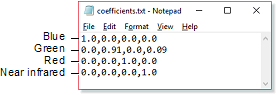
- Blue
- Green
- Red
- Near infrared (NIR)
The order of the channels you specify must be the same as the order of the channels in the input file.
MONITOR
The program progress can be monitored by printing the percentage of processing completed. A system parameter, MONITOR, controls this activity.
Available options are:
- ON: Turns the monitor ON (default)
- OFF: Turns the monitor OFF (recommended if running in batch or background mode)