GENAPEO
Calculate exterior orientation from first and last photo of flight line
Description
GENAPEO calculates the exterior orientation (EO) of each photo in a CATALYST Professional
OrthoEngine project file based on the x, y, and z position of the first and last photo of each flight line.
Parameters
| Name |
Type |
Caption |
Length |
Value range |
| OEPROJI * |
String |
Input OrthoEngine project file |
1 - 192 |
|
| OEPROJO |
String |
Output OrthoEngine project file |
0 - 192 |
|
| TFILE * |
String |
Input text file |
1 - 192 |
|
| HEIGHT |
Float |
Average elevation |
0 - 48 |
|
| ROTKAPPA |
Float |
Rotate kappa |
0 - 48 |
|
| REPORT |
String |
Report mode |
0 - 192 |
Quick links
|
* Required parameter
Parameter descriptions
OEPROJI
The path and file name of the input OrthoEngine project file (*.prj).
OEPROJO
The path and file name of the OrthoEngine project file to which to write the calculated EO.
If you do not specify a value for this parameter, the input project file is overwritten with the new information.
TFILE
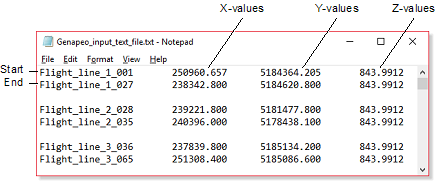
The name of the text file that contains the x, y, and z location of each photo pair (first and last photo) in the flight line or lines to interpolate the EO.
That is, if necessary, the text file can specify more than one flight line. Each flight line must be specified by the first and last photo pair in the flight line, and each pair must be on a separate line, as shown in the following figure.
Figure 1. Example of input text file
HEIGHT
The average elevation to apply to each photo to interpolate.
If the elevation of each photo pair (start/end) in the input OrthoEngine project file is unknown, you can specify an average elevation to apply. That is, if only one x and y location is specified in the EO text file, you must specify the average elevation; otherwise, you need not specify a value for this parameter.
ROTKAPPA
The rotation, in degrees, to apply to the kappa values in the EO based on the orientation of the scanned photos.
You can specify any of the following rotations:
-
0: Rotate zero degrees (north up)
-
90: Rotate 90 degrees (north right)
-
180: Rotate 180 degrees (north down)
-
-90: Rotate -90 degrees (north left)
The interpolated EO values will rotate the kappa values based on the value you specify.
This parameter is optional.
REPORT
Specifies where to direct the generated report.
Available options are:
- TERM: generates a report on the terminal (default)
- DISK: generates a report on file "IMPRPT.LST"
- OFF: turns off report generation
- <filename>: appends a report to the specified file
Details
GENAPEO interpolates the EO for each photo of a flight line based on the first and last x, y, and z positions. If necessary, you can specify more than one flight line. You can also, as an option, rotate the calculated kappa angles to match the scanned kappa angles. That is, if the photos were not scanned according to the direction of the flight, you can rotate the kappa.
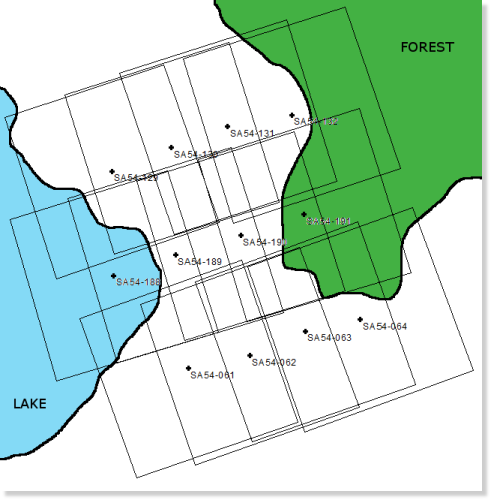
In cases where the first or last x, y, and z positions of a flight line cannot be determined accurately; typically, with water or forest, you can enter the starting or ending photo positions where the x, y, and z can be determined, GENAPEO can then extrapolate the x, y, and z positions of the remaining flight line.
For example, the following figure shows three flight lines consisting of 16 photos. The position of the first and last photo in the second (middle) flight line cannot be determined due to the lake and the forest.
Figure 2. Flight line with photos for which to extrapolate position
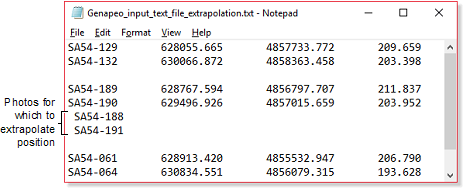
In keeping with the example, the entries in the text file to do the necessary extrapolation are as shown in the following figure.
Figure 3. Text file used to extrapolate position
GENAPEO interpolates the EO for each photo in an
OrthoEngine project file. The x and y positions are interpolated between the positions provided in the specified text file. The output is an
OrthoEngine project file with interpolated EO positions.
Example
Calculates the EO based on the x, y, and z positions of the first and last photo of the flight line. Each photos is scanned 90 degrees (north right).
EASI>OEPROJI = "airphoto_input.prj"
EASI>OEPROJO = "airphoto_output.prj"
EASI>TFILE = "xyz.txt"
EASI>HEIGHT =
EASI>ROTKAPPA = 90

EASI>R GENAPEO
© PCI Geomatics Enterprises, Inc.®,
2026. All rights reserved.