FAV
Averaging (mean) filter
Description
FAV performs an averaging of the values in one or more of the channels you specify. Channels containing amplitude, decibel, or complex values are converted to intensity prior to averaging.
Parameters
| Name |
Type |
Caption |
Length |
Value range |
| FILE * |
String |
Input file name |
1 - 192 |
|
| DBIC * |
Integer |
Input raster channels |
1 - |
|
| DBOC * |
Integer |
Output raster channels |
1 - |
|
| FLSZ |
Integer |
Filter size (pixels, lines) |
0 - 2 |
1 -
Default: 3,3 |
| MASK |
Integer |
Area mask |
0 - 4 |
See parameter description |
| BGRANGE |
Float |
Range of background values (min, max) |
0 - 2 |
|
| FAILVALU |
Float |
Failure value |
0 - 1 |
|
| BGZERO |
String |
Set background to zero |
0 - 3 |
YES | NO
Default: YES |
| MONITOR |
String |
Monitor mode |
0 - 3 |
ON, OFF
Default: ON |
* Required parameter
Parameter descriptions
FILE
The name of the PCIDSK file (.pix) that contains the channel to filter.
DBIC
The input image channels to filter.
DBOC
The output channels to which to write the filtered result.
The output channels can be the same as those you specify as input. If you specify an area mask, only the area under the bitmap mask is written to the output channels.
FLSZ
The size of the filter, in units of pixels and lines.
The filter need not be square. For example, FLSZ = i, j, where i and j are odd integers greater than 1.
If you do not specify a second value, a value equal to the first is applied. The default value is 3,3 for a filter size of 3 x 3.
MASK
The window or bitmap that defines the area to process in the input raster, which you can specify as an option.
If you do not specify a value for this parameter, the entire channel is processed.
If you enter only a single value, that value represents the channel number of the bitmap segment in the
input file. All the pixels in the bitmap segment you specify, having a pixel value of one, define the area to process.
If you enter four values, they define the x and y offsets and x and y dimensions of a rectangular window identifying
the area to process. The x-offset and y-offset define the upper-left starting pixel coordinates of the window. X-size is the number of pixels that define
the window width. Y-size is the number of lines that define the window height.
Only the area under the mask is written to the output. Pixels that are outside the mask, but within the filter-size window, will be
used to determine the values of the output pixels.
BGRANGE
The range of background values. All pixels with values in the minimum and maximum background range are excluded from the calculations. If you enter only one value, the image contains only one background value. If you do not specify a value for this parameter, the image contains no background value.
FAILVALU
The pixel value that represents an unknown or invalid pixel. All pixels of the failure value you specify are excluded from the calculations. If you do not specify a value for this parameter, no failure value is applied.
BGZERO
Whether to keep the values outside the specified mask area or set them to zero.
Available options are as follows:
-
YES: Sets background values to zero. This is the default value.
-
NO: Keeps values outside mask area.
If you do not specify an area mask, this parameter is ignored.
MONITOR
The program progress can be monitored by printing the percentage of processing completed. A system parameter, MONITOR, controls this activity.
Available options are:
- ON: Turns the monitor ON (default)
- OFF: Turns the monitor OFF (recommended if running in batch or background mode)
Details
FAV computes the mean (average) of the gray-level values that surround each pixel in a rectangular filter window you define. This effect smoothes the image and eliminates noise. With channels with SARPixelContent set to Amplitude or Decibel, the input values are converted to Intensity prior to computing the average. With complex-valued layers, such as [C16S] and [C32R], the output represents the argument of the coherent phase, scaled to the average intensity.
You specify the background values with the BGRANGE parameter. If you specify only one value for the background range, the maximum and minimum values are considered the same. All pixels in the range you specify are excluded from calculation.
The failure value specifies a pixel value that represents an unknown or invalid pixel. All pixels with a value equal to the failure value are excluded from calculation.
The dimensions of the filter window must be an odd number. The minimum filter size is 1 x 3 (or 3 x 1). The filter window need not be square.
With the MASK parameter, you specify the area in the input channel to process. When you do so, only the area under the mask is filtered, and the rest of the image remains unchanged.
If you specify a single mask value, it points to a bitmap segment that defines the area to filter. If you specify four values, they define the x and y offsets and the x and y dimensions of the rectangular window in the image to filter.
If you do not specify a mask, the entire image is processed.
Examples
A bitmap that delineates urban land uses is stored in segment 4 of the file irvine.pix. FAV is run by using a 5 x 5 averaging window on the urban features of channel 4 only. The filtered result is written to channel 8.
EASI>file = 'irvine.pix'
EASI>dbic = 4 ! use near infrared
EASI>dboc = 8 ! output channel
EASI>flsz = 5,5 ! use a 5 x 5 filter
EASI>mask = 11 ! bitmap mask
EASI>bgrange = 0 ! remove background values
EASI>failvalu	=
EASI>bgzero = ! default, set background to zero

EASI>RUN FAV
Smooth the 16-bit elevation data stored in channel 10 of the file irvine.pix using a 21-square filter. The filtered result overwrites the original input data.
EASI>file = 'irvine.pix'
EASI>dbic = 10 ! use elevation data
EASI>dboc = 10 ! overwrite input data
EASI>flsz = 21,21 ! use a 21 x 21 filter
EASI>mask = ! process entire image
EASI>bgrange = ! no background values
EASI>failvalu = ! no failure value
EASI>bgzero = ! default, set background to zero

EASI>RUN FAV
Convert four complex-valued channels to a smoothed (5 x 5) image containing four real-valued channels written as decibels.
Note: In this example, the layer metadata SARPixelContent is set to Decibel by PSIQINTERP. The unfiltered decibel input is converted to intensity prior to computing the average and converting the result back to decibel.
EASI>FILI = "complex_valued_SLC.pix"
EASI>DBIC = 1,2,3,4
EASI>CINTERP = "decibel"
EASI>DBOC =
EASI>FILO = "smoothed_decibels.pix"
EASI>RUN PSIQINTERP

EASI>FILE = FILO
EASI>DBIC = 1,2,3,4
EASI>DBOC = 1,2,3,4
EASI>FLSZ = 5,5
EASI>RUN FAV
Overwrite four unfiltered complex channels with four filtered complex layers of size 3 x 7.
EASI>FILE = "complex_valued_SLC.pix"
EASI>DBIC = 1,2,3,4
EASI>DBOC = 1,2,3,4
EASI>FLSZ = 3,7
EASI>RUN FAV
Algorithm
FAV performs spatial filtering on individual pixels in an image by using the gray-level values in a square or rectangular window that surrounds each pixel. The dimensions of the filter size must be odd and can range from 1 x 3 or 3 x 1.
All pixels are filtered. To filter pixels located near the edges of the image, edge pixel values are replicated to provide sufficient data.
        +---------+
        |a1 a2 a3 |
        |a4 a5 a6 |     <---   3 x 3 filter window
        |a7 a8 a9 |
        +---------+
The averaging filter calculates the sum of all pixels in the filter window and divides that sum by the number of pixels in the filter window.
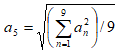
With real-valued input channels with SARPixelContent set to Amplitude.
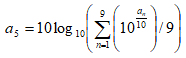
With real-valued input channels with SARPixelContent set to Decibel.
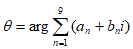
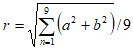
With complex-valued input channels with the real part given as
an
and the imaginary part given as
bn
, the real and imaginary parts of the filtered output are given by

and

, where:
-
- –and–
-
© PCI Geomatics Enterprises, Inc.®,
2026. All rights reserved.