DEM extraction uses image correlation to find matching features on the left and right image of a stereo pair. The best way to find these matching features is a hierarchical approach using a pyramid of reduced resolution images.
The first attempt at correlation is performed on very coarse versions of the images. This allows OrthoEngine to match prominent features accurately, which forms the basis for further correlation attempts. The next correlation attempts are performed to match finer features on higher and higher resolution versions of the images. Finally, correlation is performed on images at full resolution, which provides the highest precision for the terrain in the digital elevation model (DEM). This correlation technique speeds up the image correlation process and reduces the number of mismatches.
DEM Detail determines how precisely you want to represent the terrain in the DEM. Selecting Extra High, High, Medium, or Low determines at which point in correlation process you want to stop.
- EXTRA HIGH: the correlation option proceeds through all image resolution levels, going beyond full-resolution using a smaller window to extract higher-level details.
- HIGH: the correlation operation that matches images in the overlap region proceeds through all image resolution levels to the full-resolution image.
- MEDIUM: the correlation operation proceeds at an intermediate resolution level
- LOW: the correlation operation is performed only at the coarsest resolution level
Pixel Sampling controls the size of the pixel in the final DEM relative to the input images. The higher the number you specify, the larger the DEM pixel will be, and the faster the DEM is processed.
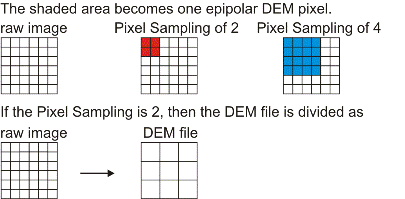
- a low-resolution DEM (high-numbered Pixel Sampling) if the terrain is fairly flat, but retain high precision for the pixel values in the DEM (high DEM Detail).
- a high-resolution DEM (low-numbered Pixel Sampling) if your imagery is coarse such as SPOT or RADARSAT data, and select low DEM Detail to speed up the process or produce a smooth DEM.
- a full-resolution DEM (Pixel Sampling of 1) for aerial photographs, which would contain very fine features such as light posts and bushes, but need a smoother DEM that represents the terrain better (low DEM Detail).