You can use existing geocoded images as a source for the ground control coordinates. By matching a feature in the geocoded image to a feature in the raw image, you can then transfer the coordinates to the point in the raw image. By doing so, you can collect as many ground control points (GCP) as you want.
If you are creating a project to mosaic raw (unreferenced) images, you can select one of the raw images as the source or master image for the coordinates. By matching a feature in the master image to a feature in an overlapping raw image, you can transfer the pixel-and-line coordinates from the master image to the images that overlap it. In the areas that overlap between the master image and the other raw images in the project, collect GCPs.
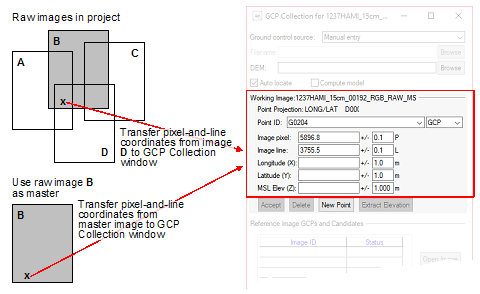
- Collect GCPs on the images that overlap the master.
- Correct the overlapping images.
- Mosaic the overlapping images.
- Return to GCP Collection, and then collect GCPs on the remaining images by using the mosaic as a geocoded image.
- Correct the remaining images.
- Add the remaining images to the mosaic.