When you want to filter out large stockpiles of debris to find the underlying real digital terrain model (DTM), use the Break Line tool.
- Calculate the amount of quarry stockpile on a lot
- Measure the volume of earth displaced after a mudslide
For example, large, often man-made, landforms can lean up against the side of a cliff, or sprawl above the top of the cliff. Typically, the edges of the cliff are averaged to give a rough estimate of the DTM. However, by using break lines, you can get a much more accurate calculation of the volume of the debris stockpile in question.
Start by creating a working-area polygon at the area of interest (AOI). When you create the working-area polygon, it is best to entirely surround the stockpile, with the top of the cliff and the bottom of the cliff at the edges, as shown conceptually in Figure 1.

Follow the contour of the cliff base and the cliff rim. You can draw several break lines in succession to preserve more detail of the cliff, if necessary.
In Figure 2, image A shows a DSM with a stockpile of earth, rock, or other debris that obscures the cliff top and the cliff bottom.
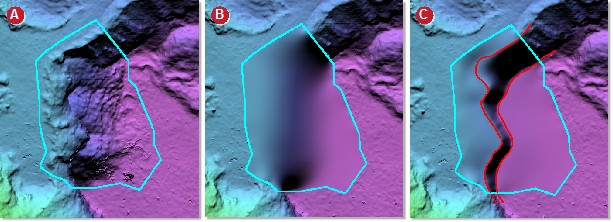
Image B is without using break lines and with the Fill from edges filter applied. Image C is with break lines and the Fill from edges filter applied.
Filters you can use with break lines
- Terrain filter (flat)
- Terrain filter (rough)
- Remove pits
- Remove bumps
- Remove bumps (keep linear)
- Fill from edges
The filter used most commonly is Fill from edges.