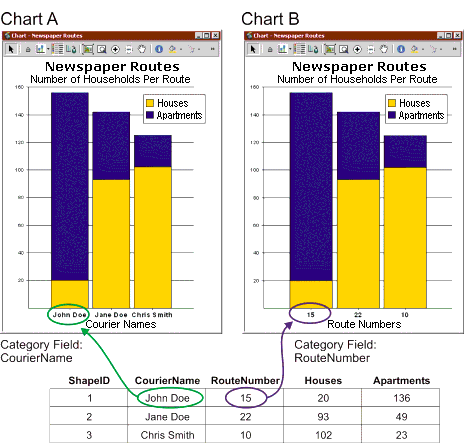
The Category field list on the Chart Definition window determines which field is used to identify the records used in the chart. It affects what is displayed on the x-axis, the legend, or the y-axis depending on the chart type and the Series in setting.
| Chart Type | Series in: Fields | Series in: Records |
|---|---|---|
| | Category field displays on: | Category field displays on: |
| Column | x-axis | legend |
| Bar | y-axis | legend |
| Line | x-axis | legend |
| Area | x-axis | legend |
| Pie | legend | not displayed |
| Scatter | not displayed | legend |
The field that you select depends on what you want to emphasize or what attribute most clearly represents the data in your chart. For example, in the following figure the chart displays the same data: the number of houses and apartments for each newspaper route. If you have new customers to add on Second Avenue which falls along both route 15 and 22, Chart A is going to be less helpful unless you have memorized the names of the couriers responsible for the routes. Chart B, on the other hand, gives you the route number immediately.