Parameter descriptions
Input Scenes
The path and name of the folder containing RAW SAR scenes or ingested scenes.
The folder cannot contain a mixture of sensor types; rather, keep multiple sensor types separate, as the module is capable of traversing nested folders.
Output Folder
The path and name of the folder to which to write filtered SAR.
Overwrite Results
Select this check box to overwrite the existing output files, if any exist. If this check box is left clear, and an output file exists in the relevant folder, the status of the job displays a message informing you of the existence and name of the output file. The message is also written to the event log of the job.
Send Email
If necessary, you can set up CATALYST Enterprise to send an email notification on job start and job completion.
With this check box selected, an email message is sent to each address specified in the Email Addresses box after the job starts and on completion.
You can specify one or more addresses, and each must be separated by a comma or a semi-colon. The email address of the user currently logged in displays by default.
Filter Type
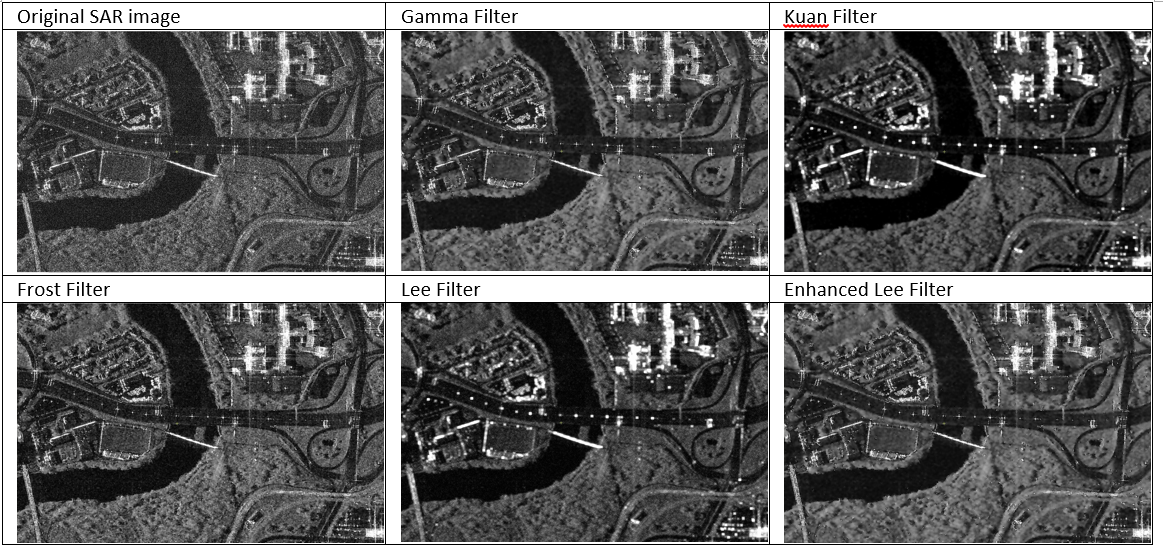
The type of filter to apply to the data. The Lee filter is a standard deviation based filter that calculates the new output pixel values with statistics computed within the individual filter windows. The Enhanced Lee filter is an adaptation of the Lee filter and also uses local statistics based upon the coefficient of variation. Each pixel is put into one of three classes: 1) homogeneous class, where the pixel value is replaced by the average of the filter window, 2) heterogeneous class, where the pixel value is replaced by a weighted average, or 3) point target class, where the pixel value is not changed. The Frost filter is an exponentially damped circularly symmetric filter, where a calculation based on the distance from the filter centre, the damping factor and the local variance determines the new pixel value. The Enhanced Frost filter is similar to the Frost filter, where the pixels are separated into the three classes in a manner similar to the Enhanced Lee filter. The Kuan filter transforms the multiplicative noise model into an additive noise model. This filter is similar to the Lee filter but uses a different weighting function. The Gamma filter is similar to the Kuan filter, but differs by assuming the input data is gamma distributed.
- Gamma:This filter is used primarily to suppress speckle. It smooths image data, without removing edges or sharp features in the images. You can use this filter for a wide range of Gamma-distributed images, such as those containing forested areas, agricultural lands, and oceans. The filter also preserves the observed pixel value for non-Gamma distributed images. The Gamma filter minimizes the loss of texture information since it uses the statistical properties of the underlying image.
- Frost:Applies a Frost filter to a SAR data set. The adaptive filter is primarily used on SAR image data to remove high-frequency noise (speckle) while preserving high-frequency features (edges). It consists of an adaptive filter used to suppress speckle where the result is further refined (or smoothed, or dampened) by applying a used-defined exponential weight to the initial filter output.
- Frost-Enhanced:Applies an Enhanced Frost filter to a SAR data set. The filter is primarily used on SAR image data to remove high-frequency noise (speckle) while preserving high-frequency features (edges). The filter smooths out noise while retaining edges and sharp features in the image. The algorithm consists of an adaptive filter where the result is further smoothed by the damping factor.
- Kuan:Applies a Kuan filter on image data. The Kuan filter is primarily used on SAR data to remove high-frequency noise (speckle) while preserving high-frequency features (edges). The Kuan filter smooths the image data without removing edges or sharp features in the images. It is only applicable for radar-intensity images.
- Lee:Applies a Lee adaptive filter to a SAR data set. It reduces speckle in the image, while preserving the edges. Edges are preserved by using an edge detector to filter only homogeneous neighborhoods. The Lee filter smooths out noise while retaining edges and sharp features in the image.
- Lee-Enhanced:Applies a Lee adaptive filter to a SAR data set. It reduces speckle in the image, while preserving the edges. Edges are preserved by using an edge detector to filter only homogeneous neighborhoods. The enhanced Lee filter divides an image into areas of three classes. The first class corresponds to the homogeneous areas in which the speckles may be eliminated simply by applying a low pass filter (or equivalently, averaging, multi-look processing). The second class corresponds to the heterogeneous areas in which the speckles are to be reduced while preserving texture. The third class includes areas containing isolated point targets, in which the filter should preserve the observed value. If the filter is too small, the noise filtering algorithm is not effective. If the filter is too large, subtle details of the image will be lost in the filtering process.
Filter Size
The filter size in horizontal (columns) and vertical (lines) directions, in pixels. The value must be an odd integer between 5 and 33.
When Adaptive Lee is selected for the Filter Type parameter, the window must be specified as a square for the Filter Size parameter, such as 9 x 9 pixels (9,9).
If no value is specified for this parameter, the module uses a default filter of 7 x 7 pixels (7,7).
Damping Factor
Optionally specifies the damping constant for the adaptive filter. This constant specifies the extent of the damping effect of the filtering. The default value of 1.0 is sufficient for most SAR images.