- Submit jobs
- Monitor job progress
- Search for specific jobs
- View logs of jobs running and completed
- Administer and maintain the system
The JPS database, typically PostGres, is used by the JPS to store information about the status of jobs, their parameters, error messages, and history logs. Note that imagery (and other related data) is NOT stored in the JPS database. Raw imagery, orthorectified images, and final mosaics are separate files (typically in TIFF format) on disk.
The JPS is a collection of Java scripts and web services that make up the operational part of the system.
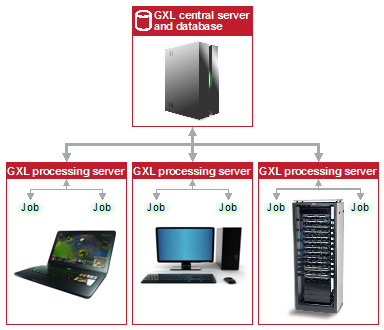
Figure 1 shows the main components and architecture of the JPS.
Jobs and modules
In CATALYST Enterprise, you run a job from a module. For example, orthorectification is a job. To orthorectify images, you run an orthorectification job from the Orthorectification module. Some jobs, known as master jobs, divide the work into smaller tasks and create child jobs that can run in parallel. For example, a job to process 100 images can create 100 child jobs, one for each image.
Processing of jobs can also occur on multiple servers, known as processing nodes. For example, suppose you have three servers each capable of running four jobs simultaneously. In such a case, 12 child jobs, each processing a single image, will run in parallel.
When you want to create a job, you select the type of job you want from the available list, which opens the job module. In the module, you specify the parameters that describe the data set, select options to apply during processing, and then submit the job. The JPS then runs the job, assigning it a unique ID, and tracks the status of the job. The system writes a log of the event, which includes information such as the applicable parameters and the settings specified for each.
The JPS processing server
Typically, the JPS processing server is installed on a single computer. However, a computer can also have more than one JPS processing server installed.
JPS Web Service (JPS-WS) is a set of Java servlets that process HTTP requests to get or set job information, such as various job states. Jobs that are actively running can use an available Python API to transparently access the JPS-WS to create new jobs, update job states, and other tasks. The Python API transmits XML documents between the API and JPS-WS. JPS-WS is based on representational state transfer (REST) architecture.
The JPS uses a collection of Java classes to poll the database for jobs, starts pending jobs as processes, and monitors running jobs. This component regularly checks the database for jobs that are ready to run, and also modifies job states based on specific criteria. In the context of the JPS processing server, a job is a process running on the server, such as orthorectification.
The JPS database is the central repository that stores all of the JPS activity, such as event history.