Radiometric differences among images can cause a patchwork effect in a mosaic. Color balancing evens out the color contrasts from one image to another to reduce the visibility of the seams and produce a mosaic that is appealing visually.
Color balancing is intended to produce a uniform mosaic by matching the histogram for each image applied to the mosaic so that, as a group, the histograms of the input images are similar in range and distribution. Automatic histogram modification can be performed either by changing each value in the histogram with a lookup table (LUT matching) or by applying a gain and bias to the original histogram. You can achieve the most realistic-looking results when you apply a small gain and bias to each histogram in the input data set due to good conditions and homogeneous vegetation growth and ground conditions that already match as closely as possible among acquisition times.
Bundle
The Bundle color-balancing method is recommended for most image mosaics. Balancing the overall mosaic occurs as a result of two steps.
The first step computes the statistics for all overlapping image areas after automatically removing anomalies in the data, such as clouds, snow, and so forth. A bundle color adjustment is then applied globally to minimize the overall differences among all overlapping areas. By doing so, the mean and sigma (brightness and contrast) are adjusted. Subsequently, small differences in overlapping areas that were not removed will remain; however, there will be fewer than there were originally.
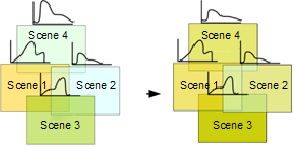
In the second step, the remaining differences are modeled with dodging. Dodging adjusts pixel values to try to minimize the differences among images. There are two possible types of dodging:
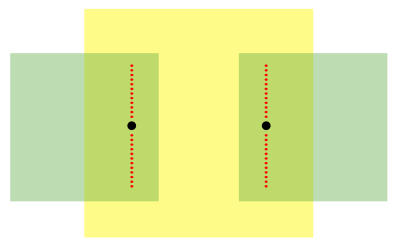
- Edge: Creates a dodging point between two overlapping images, resulting in a fairly uniform distribution of points. Each point represents a dodging line. Modifying the dodging point essentially changes the dodging line drawn between these two images. This method is used primarily with satellite imagery or airphotos that have few overlapping images.
Figure 2. Edge dodging
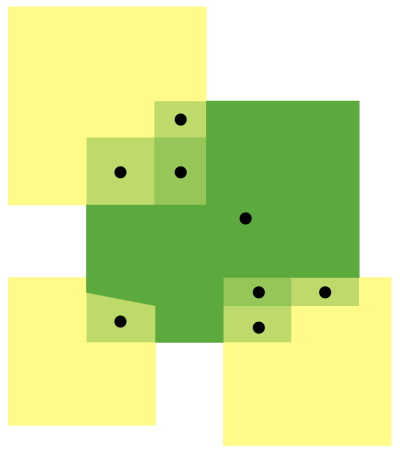
- Floating: Creates a dodging point between each overlapping image, resulting in many points scattered over the mosaic. This method is used primarily with airphoto imagery that has many overlapping images.
Figure 3. Floating dodging
With Bundle, the order of the input images does not factor in processing, because all overlapping images are used to adjust one image.
Overlap
With the Overlap method, a least-squares technique is used to determine the gain-and-bias coefficients to modify each image in sequence, starting with the first image to process, which is used as reference. The sequence is based on the sorting method. The histogram is then matched to the reference using a gain-plus-bias offset. The histograms of the two images are then combined and, for the next image, the combined scenes (mosaic) are used as reference. With the entire data set, each image in turn is selected based on the sorting method, the histogram is modified, and then added to the mosaic.
Because it is based on the sort order of adding images to the mosaic, Overlap works best with small data sets, with randomly distributed sorting (none), that is fairly uniform in nature. It is not recommended for use with large data sets when sorting is Nearest to center.

LUT
Histogram
The Histogram method uses a pre-existing image to modify a LUT so that each histogram matches exactly that of the reference image. Gain and bias are not used; instead, the reference histogram is used and the LUT is applied exactly, so that all images in the mosaic have the same number of pixels of the same intensity.
Histogram works well with images that are almost identical and have the same dynamic range and distribution. Artifacts can occur when the dynamic ranges of the input scenes vary significantly compared with the reference imagery.

Reference
The Reference method uses gain-and-bias offset to modify the input-scene histograms less aggressively than Histogram. Reference provides good-quality matching of images, with fewer outliers or artifacts than Histogram when the data is dissimilar. The variance in images is greater than Histogram, but with typically fewer artifacts.

The color balancing is based on matching the source-image histogram with that of the reference image you specify.
Neighborhood
The Neighborhood method is more intense computationally than other methods. All surrounding images are used to modify the gain and bias of the histograms, regardless of z-order (based on sorting order), and works iteratively to modify neighboring pixels. Because of this iterative method, sharp variations in color are reduced and trends in color balancing are stretched among multiple scenes.
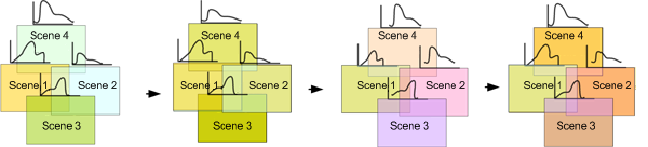
The Neighborhood method is best suited to large-area mosaics, in which features tend to change from one end of the mosaic to the other.